

Avoiding proxy detection means fixing four layers at once: your IP type, your TLS/HTTP fingerprint, WebRTC and DNS leaks, and your request behavior. Fail one layer and the other three don't matter. Start with a two-minute diagnostic check to find which layer is exposing you, then apply targeted fixes rather than guessing. A provider like NatProxies solves the IP layer, but the other three are on you.
TL;DR:
- Matching your IP type to the target is crucial, as datacenter IPs commonly get flagged instantly, whereas residential or mobile IPs usually pass without issue.
- Running quick tests on ASN, TLS fingerprint, and WebRTC leaks helps identify which layer is exposing your proxy, enabling targeted fixes instead of guesswork.
- Ensuring your TLS fingerprint and HTTP headers match a real browser prevents fingerprint-based detection, especially when using residential IPs paired with scripting signatures.
- WebRTC and DNS leaks can expose your real IP even if your HTTP requests appear clean, so testing and routing traffic through OS-level proxies or VPNs is essential.
- Applying pacing techniques with random delays and locking session parameters to a single IP prevents detection based on request timing and behavior.
Table of Contents
- How Do You Check If Your Proxy Is Detected?
- Layer 1: Pick the Right IP Type and Manage Pool Hygiene
- Layer 2: Make TLS and HTTP Headers Match a Real Browser
- Layer 3: Stop WebRTC and DNS Leaks From Exposing You
- Layer 4: Human-Like Pacing, Session Coherence, and Soft-Block Handling
- Remediation Checklist: What to Fix First
- Where NatProxies Fits Into These Fixes
- An Editorial Take on Why Most Proxy Setups Still Fail
- Get the Right NatProxies Setup for Each Layer
- Sources
- FAQ
How Do You Check If Your Proxy Is Detected?
Run three quick tests before touching anything else. Together they take about two minutes and point you straight to the failing layer, according to a practical bypass guide.
- IP classification: check the ASN behind your IP. Datacenter ASNs (AWS, OVH, Hetzner) get flagged instantly on protected targets; residential and mobile ASNs usually pass.
- TLS/JA3 fingerprint: run a JA3 checker and compare it against your declared User-Agent. A Chrome User-Agent paired with a Python or cURL TLS signature is an immediate tell.
- Header leakage: inspect outgoing requests for
X-Forwarded-For,Via, or a mismatchedAccept-Language. Genuine high-anonymity proxies never send these headers. - WebRTC and DNS leaks: load a leak-test page and confirm your real IP never appears in the ICE candidates or DNS resolution path.
Read the results together. A clean IP with a broken TLS fingerprint still gets blocked, and a perfect fingerprint on a burned IP fails just as fast.
Layer 1: Pick the Right IP Type and Manage Pool Hygiene
Datacenter IPs sit in known ASN ranges that anti-bot vendors blacklist by default, which is why they fail almost instantly on protected checkout flows, ticketing sites, and social platforms. Residential or mobile IPs are worth the extra cost specifically for sneaker releases, logins, and anything with account-level risk scoring, as detailed in this breakdown of why sneaker sites detect ISP proxies differently than residential ones.
- Check your IP's fraud score before you scale a campaign on it.
- Watch for a sudden spike in CAPTCHAs across an entire subnet. That's a sign the pool is burned, not that your setup is wrong.
- Match rotation to session type: sticky sessions for logins, fast rotation for stateless scraping.
Pool size also dictates rotation strategy. Small IPv4 pools work best with a rotate-on-ban approach, while larger pools support load-balanced rotation, and full IPv6 /64 blocks allow near-instant switching, per Lavalink's routeplanner documentation.
Pro Tip: If three or more unrelated targets block you on the first request, stop tweaking headers. The pool itself is the problem, and no amount of fingerprint work fixes a blacklisted subnet.
Layer 2: Make TLS and HTTP Headers Match a Real Browser
JA3 and JA4 fingerprints identify the TLS handshake order and cipher list your client uses, and HTTP/2 frame ordering adds a second layer anti-bot vendors check independently of your IP. A proxy-ban breakdown notes that a residential IP paired with a scripting library's default TLS signature is one of the fastest ways to get flagged, since the IP looks human but the handshake doesn't.
- Match your declared User-Agent to a TLS stack that actually produces that browser's handshake, not a generic HTTPS client.
- Send client hints in the right order:
Sec-CH-UA,Accept-Language,Accept-Encoding, and standardAcceptheaders, in the sequence a real browser sends them. - Keep header casing and order consistent across requests in the same session.
- For highest fidelity, run an actual browser engine (headless Chrome or Firefox) or a TLS-impersonating HTTP client instead of a bare request library.
Layer 3: Stop WebRTC and DNS Leaks From Exposing You
WebRTC can leak your real IP through ICE candidate gathering even when every HTTP request routes cleanly through your proxy, because WebRTC operates outside the standard HTTP proxy path unless you force it otherwise.
- Load a WebRTC leak-test page and check whether your real IP shows up alongside the proxy IP.
- If it does, route traffic through OS-level SOCKS5 or a VPN adapter rather than a browser-only proxy extension, since browser extensions rarely capture WebRTC traffic.
- Test DNS separately. If your resolver is your ISP's default, requests can leak your location even while the IP looks clean. Force DNS through the proxy or use the proxy provider's own resolver.
- Re-run both tests after each fix. A single missed leak undoes IP and TLS work entirely.
Layer 4: Human-Like Pacing, Session Coherence, and Soft-Block Handling
Fixed-interval requests are one of the clearest bot signals a detection system can catch, since real users never click at exactly the same rhythm every time. Automation researchers recommend randomized delays of 2 to 8 seconds for normal navigation and 5 to 15 seconds on sensitive targets, with occasional longer pauses that mimic a person getting distracted.
- Never switch IPs mid-session on a stateful flow. Rotating identity while cookies stay the same creates what one industry guide calls session schizophrenia, a mismatch that scores worse than sticking with one IP the whole way through.
- Keep cookies, headers, and IP locked together for logins, checkouts, and anything tied to an account.
- Pin one IP per account for the account's full lifecycle when the target supports long sessions; rotate freely for one-off, stateless scraping.
- Treat a CAPTCHA or a 429 response as an early warning, not something to retry through instantly. Retrying immediately from a fresh IP teaches the target your entire pool, which accelerates a full subnet ban rather than avoiding it.
Pro Tip: Bench any IP that trips a soft block for 24 to 72 hours before reusing it. A short cooldown often restores an IP's reputation; immediate reuse rarely does.
Remediation Checklist: What to Fix First
Anti-bot systems score IP reputation, TLS fingerprint, and behavior as one combined signal, not three separate checks. A detection analysis puts it plainly: a flawless IP paired with bot-like timing still gets blocked, while a mediocre IP with convincing behavior often survives.
- Run the diagnostic trio: IP/ASN check, JA3/TLS check, WebRTC and DNS probe.
- If the IP type is wrong for the target, switch proxy type before touching anything else.
- Match your TLS fingerprint and User-Agent, and strip any header that reveals proxy use.
- Confirm no WebRTC or DNS leak remains after the fix.
- Set pacing with jitter, and lock your rotation policy to whether the session is sticky or stateless.
- Monitor for soft blocks, bench flagged IPs, and switch providers if the same pool keeps failing across unrelated targets.
Operators should also be cautious about how aggressively they respond to blocks on their own infrastructure. Guidance on IP-based blocking practices points out that IP addresses are an imperfect identifier in both directions, which is exactly why layered signals catch what IP-only detection misses.
Where NatProxies Fits Into These Fixes
NatProxies addresses the IP layer directly with dedicated static ISP proxies and rotating residential proxies, targetable by country, state, and city. That geographic precision matters when a target checks whether your IP's claimed location matches your account's billing address, browser locale, or timezone header, one of the coherence checks that trips up mismatched setups.
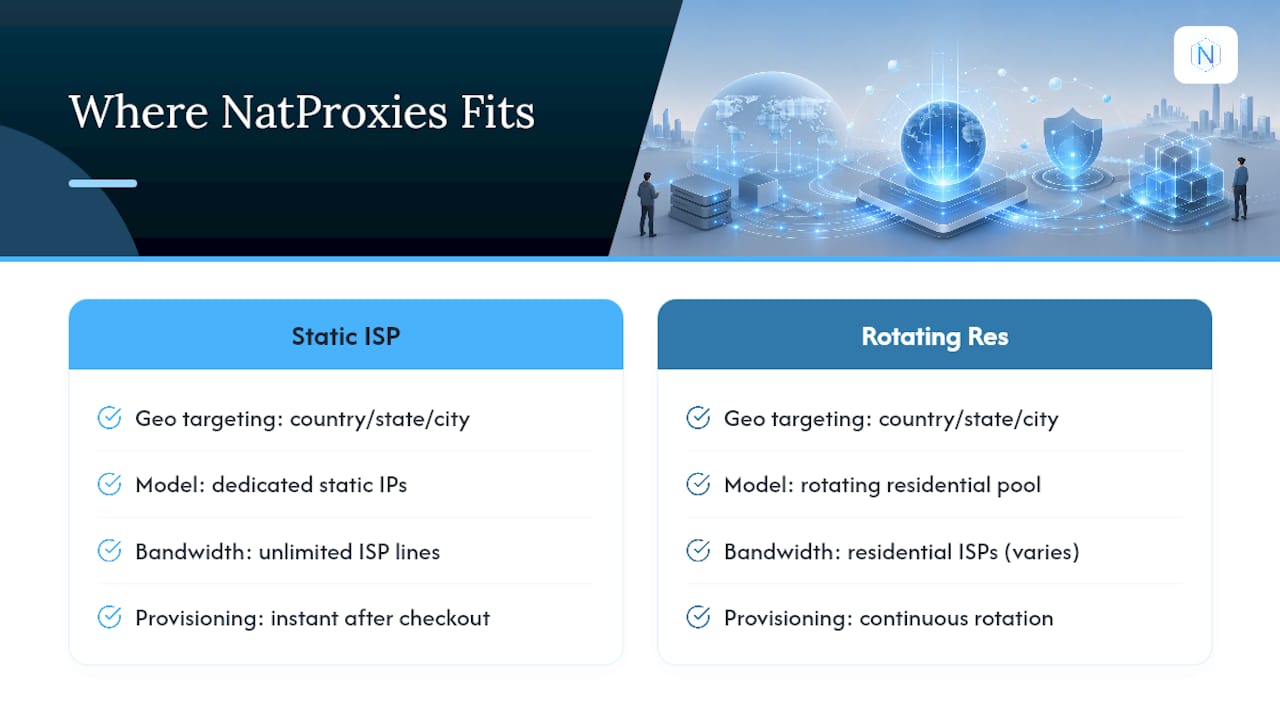
Unlimited bandwidth on the ISP lines means you're not throttled mid-session on a sticky login flow, and instant provisioning after checkout means a burned pool gets replaced in minutes rather than days. For distributed scraping across many targets, a rotating residential proxy service can cover the pool-hygiene problem described above without you managing rotation infrastructure yourself. Neither product fixes your TLS fingerprint or your request pacing. Those layers stay your responsibility no matter which proxy provider you use.
An Editorial Take on Why Most Proxy Setups Still Fail
There's no single trick that defeats every detection system, and anyone promising one is selling you something incomplete. The pattern worth noticing is how often people blame the proxy provider when the real failure sits in their own TLS stack or request timing. If a pool gets blocked on the first request across several unrelated targets, that's a genuine sign the pool itself is compromised and switching providers makes sense. But if blocks show up gradually, after a handful of requests, the problem is almost always fingerprint or behavior, not the IP. One more thing worth saying plainly: respect the target's terms of service and the law in your jurisdiction. Bypassing detection for legitimate scraping, ad verification, or account management sits in a different category than using these techniques to commit fraud or abuse a platform, and NatProxies' own acceptable use policy draws that line clearly.
— proxy
Get the Right NatProxies Setup for Each Layer
Once diagnostics show which layer is actually failing, the fix is usually a product decision, not a code rewrite. If sticky sessions on logins or account management are the pain point, AT&T Fresh ISP or T-Mobile Legacy ISP plans give you a static, dedicated IP that stays consistent for the full session lifecycle.

If the problem is distributed scraping across many targets or geographic matching down to the city level, the rotating residential line is built for that spread. Check NatProxies' ISP proxy page for specs on both lines, and confirm pricing on the pricing page before committing, currently AT&T Fresh ISP at $2.75 per IP per month and T-Mobile Legacy ISP from $1 to $2.50 per IP per month. Run your diagnostic trio first. If the IP layer turns out not to be the bottleneck, no proxy switch will fix what your TLS fingerprint or pacing is doing wrong. Start with a small ISP allocation, verify it clears your target's checks, and scale from there.
Sources
Save the output from each check. It speeds up troubleshooting the next time a target starts blocking you.
- Cyber insights 2026: threat hunting in an age of automation and AI
- Why Your Proxy Gets Banned and How to Stop It (2026 Guide)
- Lavalink routeplanner configuration
FAQ
Why Is My Proxy Being Detected?
Most detections come from a mismatch between layers, not a single broken setting. A common example is a residential IP paired with a TLS fingerprint that still looks like a scripting library, which is a known inconsistency signal that anti-bot systems flag immediately.
Is There a Way to Bypass VPN Detection?
VPN and proxy detection both work by scoring IP reputation, TLS fingerprint, and behavior together. Fixing IP type alone rarely bypasses detection. You need matching TLS/header signatures, no WebRTC or DNS leaks, and human-like pacing at the same time.
How Do I Permanently Turn Off Proxy Detection Checks?
You can't turn off a target site's detection system since it runs on their servers, not yours. What you can control is minimizing the signals that trigger it: clean IP type, matched fingerprint, no leaks, and natural pacing, following the diagnostic-first approach covered above.
What Is a Proxy Detector?
A proxy detector is a tool or service that checks whether traffic originates from a datacenter, residential, or mobile IP range and cross-references it with TLS fingerprint and behavioral signals. Running one yourself, using an ASN checker plus a JA3 tool, shows you exactly what the target site sees before you ever send it a real request.