
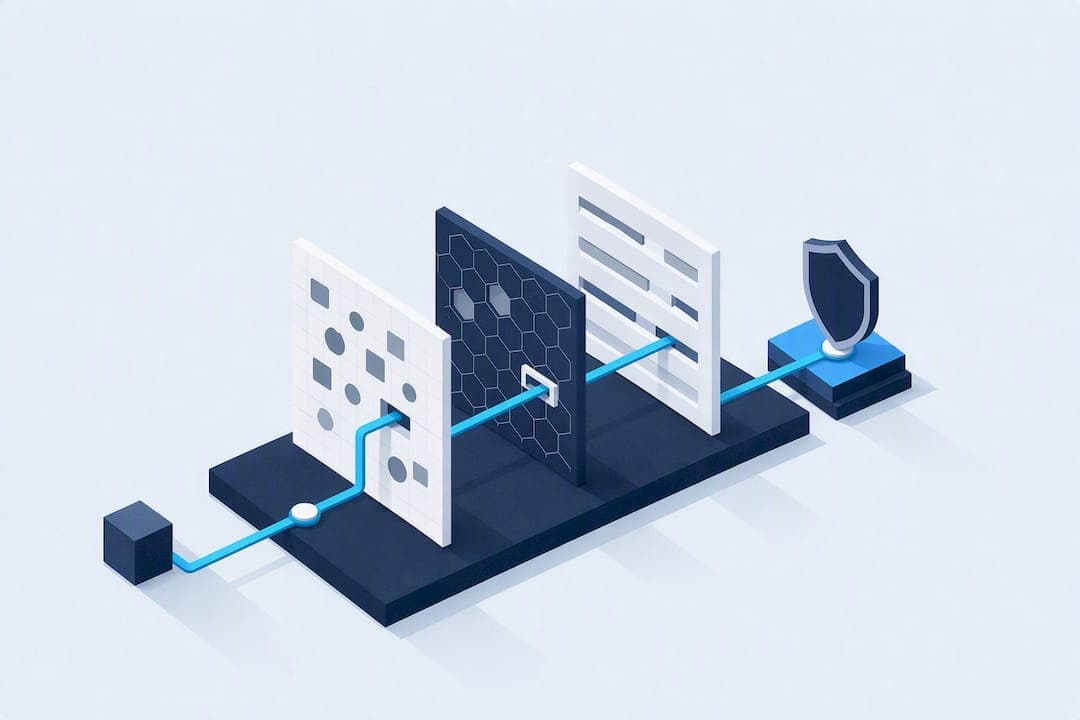
The minimal stack that reliably gets past modern anti-bot systems is: a headed real Chrome binary, TLS/JA3 fingerprints that match your claimed browser, residential or ISP proxies with sticky sessions, and behavior timing that doesn't look scripted. Add a CAPTCHA plan for the moments solving alone won't save you. If you're fighting Kasada, DataDome, or PerimeterX at scale, budget for managed infrastructure instead of maintaining this yourself.
TL;DR:
- Matching your TLS and header fingerprints precisely to a real browser and routing through residential or ISP proxies is essential for consistent success.
- Behavioral realism, including mouse movements and timing, prevents detection at the session level, especially when combined with network-layer fixes.
- Maintaining end-to-end session consistency — across fingerprints, IP reputation, behavior, and header order — is more effective than fixing individual signals alone.
- DIY bypass stacks become less viable as request volume and vendor complexity increase, making managed infrastructure a more practical choice beyond low-volume use.
- Prioritizing network-layer accuracy before browser and behavior adjustments significantly enhances long-term bypass stability.
Table of Contents
- What Modern Bot Detection Actually Checks
- The Fingerprints and Signatures That Give You Away
- How to Actually Implement a Working Bypass
- Code Patterns and Verification Checks That Catch Problems Early
- When DIY Stops Being Worth It
- Staying on the Right Side of the Line
- Where Proxy Choice Fits Into the Bypass Stack
- Detection Methods That Go Beyond Browser Fingerprints
- Where Anti-Bot Technology Is Headed Next
- What Actually Worked, and What Didn't
- The Blueprint That Actually Holds Up
- Get the Network Layer Right Before You Touch Anything Else
- Sources
What Modern Bot Detection Actually Checks
Anti-bot vendors don't rely on one signal. They stack three layers, and each one can end your request before the next even runs.
The network layer looks at your TLS handshake, JA3/JA4 fingerprint, HTTP header order, and IP reputation before a single byte of your page load happens. Cloudflare and PerimeterX evaluate these server-side, which means a mismatched TLS signature can get you blocked before any JavaScript executes, according to SitePoint's analysis of anti-bot systems. The client layer runs JavaScript that probes navigator.webdriver, WebGL rendering output, canvas hashing, and dozens of browser API quirks that headless environments answer differently than real ones. The behavior layer watches what happens after you load: mouse movement, scroll velocity, keystroke timing, and how naturally your session progresses through a site.
This is why single-signal fixes fail so consistently:
- Spoofing a user agent string does nothing if your TLS fingerprint still screams "Python requests library."
- Rotating IPs without fixing your JavaScript fingerprint just gets your new IPs burned faster.
- Passing the JS checks but moving your mouse in perfect straight lines still flags you at the behavior layer.
Vendors specialize differently. Cloudflare leans hard on network-layer signals and rate reputation. PerimeterX and Kasada weight behavioral and challenge-response logic more heavily, which is part of why they're harder to automate around.
The Fingerprints and Signatures That Give You Away
Before writing a single line of bypass code, run a diagnostic pass on your target. You can identify which vendor you're up against from response headers, cookie names, and JS filenames, and that identification changes your entire approach, per Scrapfly's breakdown of anti-bot signatures.
Here's what to look for on the first request and response:
| Signal | What to check | What it tells you |
|---|---|---|
| Response headers | CF-RAY, X-Px-Block, custom vendor headers | Confirms Cloudflare or PerimeterX is active |
| Cookies | __cf_bm, _abck, _px3, KP_UIDz | Identifies Cloudflare, Akamai, PerimeterX, or Kasada respectively |
| Status codes | Bare 429 with no challenge page | Common Kasada signature, especially on repeat requests |
| JS filenames | Obfuscated scripts loaded before content render | Marks the challenge script vendors use to fingerprint you |
| Header order | Sequence of your outgoing HTTP headers | Mismatched order versus a real browser is a red flag on its own |
Record these on every session and diff them against a genuine browser session hitting the same URL. If your TLS handshake, header order, and cookie set don't match a real Chrome session byte for byte, you've found your leak. This diffing habit matters more than any single fix, because signal consistency across TLS, headers, and client fingerprints outweighs perfecting any one property in isolation, as Scrapfly notes in its protection guide.
How to Actually Implement a Working Bypass
Fixing detection is mostly about removing lies, not adding more of them. Here's the sequence that holds up in production:
- Run headed Chrome, not headless. Headless Chromium leaves behavioral and rendering artifacts that detectors catch immediately. A real, visible Chrome binary, even on a server via a virtual display, closes most of that gap.
- Match your TLS/JA3 fingerprint to your claimed browser. If your HTTP client says "Chrome 131" but your TLS handshake looks like Python's
urllib3, you're caught before your first response even loads. - Align your HTTP header order and Sec-CH-UA values. Real Chrome sends headers in a specific sequence with specific client-hint values. Copy that order exactly.
- Route through residential or ISP proxies with session stickiness. Datacenter IPs carry reputation baggage from prior abuse. Keep the same IP for the life of a session, and match the proxy's geography to the account or content you're requesting.
- Build a real behavior model. Mouse movement with acceleration curves, scroll events with variable speed, and typing cadence with natural pauses. Random
sleep()calls between requests do not simulate a human; they simulate a very patient bot. - Handle CAPTCHAs conditionally. Detect the CAPTCHA type first. Some are solvable programmatically or via a human-in-the-loop service; others (especially newer risk-based challenges) are a signal that your upstream fingerprint is already broken, and solving the CAPTCHA won't fix the underlying detection.
The biggest implementation mistake teams make is layering fake browser properties instead of removing the real inconsistencies. Stripping synthetic navigator patches tends to work better than adding more of them, since those patches frequently create fingerprint mismatches that are more detectable than having no patch at all, based on findings from the playwright-bot-bypass project.
Pro Tip: Test your stack against a target that logs its own detection reasoning if one exists, or at minimum diff your session's TLS and header fingerprint against a real browser hitting the same URL. A one-property mismatch is often the entire reason you're blocked.
Code Patterns and Verification Checks That Catch Problems Early
Headed Playwright with runtime patches and undetected-chromedriver both get you most of the way there, but neither is a complete solution on its own. They fix browser-level tells (navigator.webdriver, missing Chrome runtime objects, automation-flagged CDP properties) but they don't touch your TLS fingerprint or your proxy's IP reputation. You still need to handle those separately at the network layer.
A workable flow looks like this: detect which vendor is active from headers and cookies, apply the appropriate stealth patches for that vendor, route the session through a residential or ISP proxy matched to your target geography, then verify the result before trusting it.
Verification should happen automatically, not by eyeballing a screenshot. Build assertions that check for:
- Challenge page markers in the response body (specific div IDs, script tags, or redirect patterns).
- Presence or absence of vendor cookies you expect (
_abckshould exist and update between requests if PerimeterX is active). - HTTP status codes outside the 200 range that indicate a soft block rather than a hard failure.
- Fingerprint drift across sessions, which you catch by capturing your TLS JA3, HTTP/2 SETTINGS frame, and key browser API responses on every run and diffing them against a known-good baseline.
Measured pass-rate improvements from headed-mode-plus-artifact-stripping approaches are notable enough that community projects treat it as the default starting point rather than an optional add-on, per the playwright-bot-bypass repository. Build that diffing habit into your CI pipeline, not just your debugging sessions.
When DIY Stops Being Worth It
Maintaining your own bypass stack is fine at low volume. It stops being fine once you cross certain thresholds.
- Request volume. Once you're running tens of thousands of requests a day across a single target, the maintenance cost of tracking vendor changes starts to outweigh the savings of not paying for managed infrastructure.
- Number of vendor targets. Supporting three different anti-bot vendors means maintaining three different bypass logics, each updating on its own schedule.
- Vendor hardness. Kasada in particular is built to actively probe your automation and obfuscate its own challenge logic, which breaks DIY approaches faster than almost any other vendor, according to Scrapfly's vendor analysis. Many engineering teams treat Kasada as managed-only from day one.
A sensible escalation sequence runs stealth browser routes first, then residential proxies, then a managed CDP-unblock API, then managed CAPTCHA solving, moving to the next step only when the current one fails, as outlined by Browserless's bot detection guide. Real-world comparisons consistently show DIY stacks work in bursts but degrade in reliability faster than managed solutions as vendors update their detection logic, per SitePoint's testing notes.
Staying on the Right Side of the Line
Run these techniques only against targets you're authorized to test or scrape. Check robots.txt where the target's terms make it relevant, and keep your request rate well below anything that resembles a denial-of-service pattern. Watch for error-rate spikes, which usually mean you've triggered something you didn't intend to. If your scraping touches personal data, handle it with the same care you'd apply to any data collection: minimize what you store, and don't retain more than the task requires.
Where Proxy Choice Fits Into the Bypass Stack
Your browser and behavior work can be flawless and still fail if your IP reputation is bad. Managed proxy infrastructure with geographic targeting and consistent session handling closes the network-layer gap that browser-level fixes can't touch, since IP reputation and TLS-level consistency both depend on the connection itself, not just what runs inside the browser.
Different proxy types solve different parts of the detection problem:
- ISP proxies carry the reputation of a real internet service provider rather than a flagged datacenter range, which helps most when your TLS and header alignment are already solid and IP reputation is the last piece. NatProxies' dedicated ISP proxies are built specifically for this kind of persistent, low-flag session.
- Rotating residential proxies work best against reputation-heavy checks where you need volume and geographic spread, since each request routes through a real consumer connection.
- Mobile 4G/5G proxies matter most when a target expects session realism tied to a specific geography, since mobile carrier IPs carry different reputation signals than fixed-line residential or datacenter ranges.
For a deeper breakdown of which type fits which job, NatProxies' comparison of ISP versus residential versus mobile proxies walks through the trade-offs in more detail.
Detection Methods That Go Beyond Browser Fingerprints
Fingerprint matching and proxy rotation solve the visible half of the problem. The harder half is machine learning models that score sessions on patterns you can't see in a single request.
These models don't ask "does this look like a bot right now." They ask "does this session's full behavioral trajectory match the distribution of real human sessions on this site." That distinction matters because it means passing every individual check (TLS, headers, JS fingerprint) can still get you flagged if your aggregate session shape doesn't match. A model trained on real user data notices things like: how long you dwell on a product page before adding it to a cart, whether your navigation path follows realistic site structure, or whether your request timing has the jitter of a human mind wandering versus the precision of a loop.
Beating this requires thinking past individual requests toward session-level realism. That means varying your navigation paths instead of hitting the same URL pattern every run, introducing genuine pauses tied to page content length rather than fixed intervals, and avoiding perfectly repeatable session shapes across your automated runs. Some teams train their own behavioral models on real user session logs (where they have consent to do so) to generate more convincing synthetic behavior. Others simply randomize enough parameters, page dwell time, click sequence, scroll depth, that no two sessions look identical, even when they're accomplishing the same task. The goal isn't fooling a single rule. It's not standing out in a distribution.
Where Anti-Bot Technology Is Headed Next
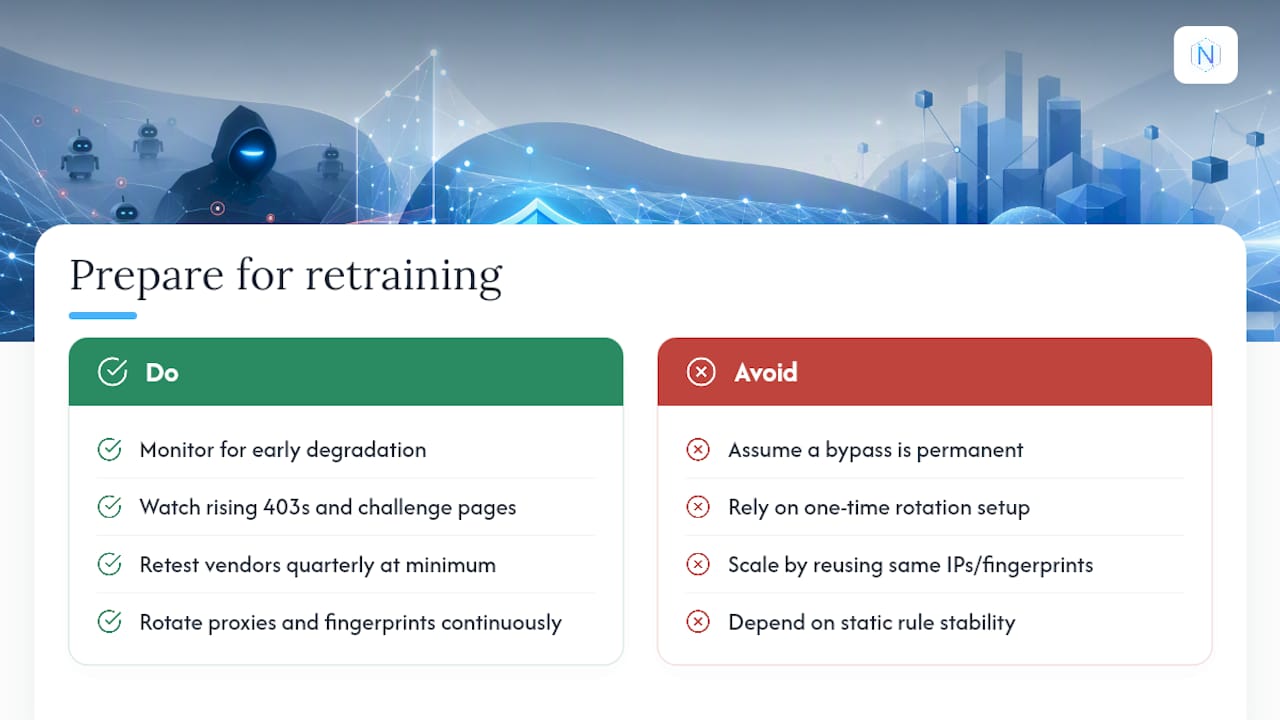
Detection vendors are moving away from static rule sets and toward continuously retrained models that update on live traffic. That shift changes how you should think about bypass longevity.
A signature-based detector (block this specific header pattern, flag this specific cookie value) stays stable until the vendor manually updates it. A machine-learning-based detector can shift its decision boundary within days based on new traffic it observes, including traffic from bypass attempts that got caught. This means a bypass method that works today can degrade without any code change on your end, purely because the model retrained on data that included your traffic pattern.
Vendors are also increasingly correlating signals across sessions rather than judging each one in isolation. That means the same proxy IP used across a dozen sessions with slightly different browser fingerprints, or the same fingerprint reused across a dozen IPs, becomes its own signal, even if each individual session looks clean. Session-level correlation defeats a lot of naive scaling approaches where teams simply spin up more of the same automated profile.
The practical response is to expect maintenance, not permanence. Build your monitoring to catch degradation early (rising 403s, sudden challenge-page appearances, cookie values that stop updating as expected) rather than assuming a working configuration stays working. Budget engineering time for retesting quarterly at minimum against any vendor you rely on heavily, and treat proxy and fingerprint rotation not as a one-time setup step but as an ongoing practice that needs revisiting as vendors retrain their models.
What Actually Worked, and What Didn't
The clearest pattern across engineering teams tackling this problem is that partial fixes fail in predictable ways, and full-stack consistency succeeds in equally predictable ways.
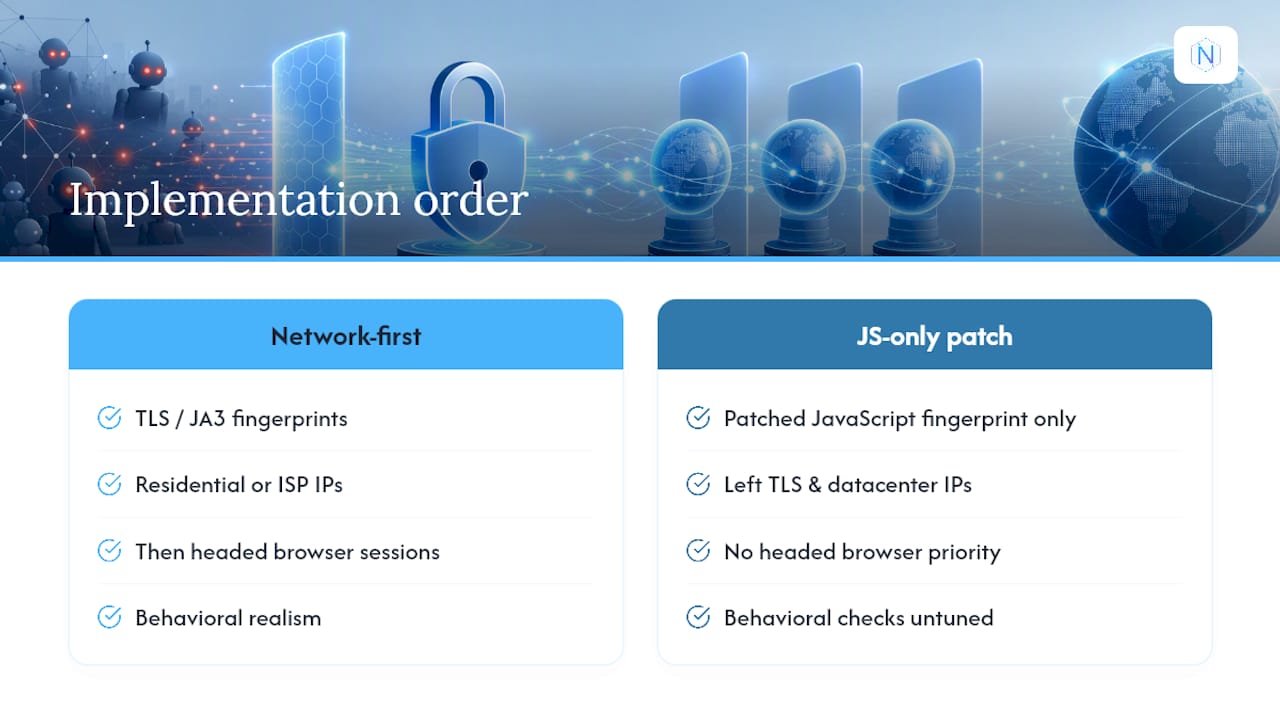
Teams that patched only their JavaScript fingerprint, adding stealth plugins to mask navigator.webdriver while leaving their TLS handshake and datacenter IP untouched, typically saw short-term success followed by rapid degradation. The pattern makes sense once you see the layered structure: fixing the client layer while leaving the network layer exposed just delays detection by however long it takes the vendor's network-layer check to flag the IP or TLS mismatch.
Teams that started at the network layer first, matching TLS/JA3 fingerprints and routing through clean residential or ISP IPs, then added headed browser sessions with behavioral realism, saw more durable results. The order matters here: fixing network-level signals first removes the fastest, cheapest detection trigger, so your client-layer and behavioral work actually gets evaluated instead of being blocked before it matters.
The clearest failure case involved a team scraping a Kasada-protected target with a fully DIY stack, headed Chrome, proxy rotation, behavioral timing, all of it. It worked for roughly two weeks before Kasada's interrogation logic adapted and broke the approach entirely. That's consistent with how Scrapfly characterizes Kasada: its challenge logic is built specifically to resist reverse engineering, which is why teams facing it tend to move to managed solutions faster than they do against other vendors. Understanding your target's specific vendor before investing weeks of engineering time saves you from repeating that exact mistake. Workflow platforms like Gleanit are worth considering if you'd rather offload the automation orchestration layer entirely and focus your engineering time on the fingerprint and proxy work instead.
The Blueprint That Actually Holds Up
Most advice on this topic treats bot detection like a checklist: spoof this header, rotate this proxy, solve this CAPTCHA. That framing is wrong, and it's why so many bypass attempts work for a week and then quietly stop working.
Detection systems don't grade you on individual properties. They grade you on whether everything about your session agrees with everything else. A perfect TLS fingerprint paired with a sloppy proxy, or flawless behavioral timing paired with a mismatched header order, still fails, because the inconsistency itself is the signal. That's the part conventional advice underweights: it presents bypass techniques as a menu you can pick from, when they're really a system you have to get right end to end.
If you take one thing from this, prioritize consistency over cleverness. A moderately good TLS match, moderately good proxy, and moderately good behavior model, all agreeing with each other, will outlast a brilliant fix to just one layer. Start simple: fix your network-layer signals first, since that's usually the cheapest fix and the first thing that gets you blocked. Then layer in browser realism, then behavior. Escalate to managed infrastructure only when a specific vendor's engineering resistance (Kasada being the clearest example) makes DIY maintenance a losing time trade. That's not a failure of your engineering. It's just an honest read of where the cost curve bends.
— proxy
Get the Network Layer Right Before You Touch Anything Else
Everything in this piece assumes your proxy layer is solid, because it's the foundation everything else gets built on. If your IP reputation is bad, no amount of browser or behavioral polish saves the session. Some proxy providers run dedicated static ISP proxies for US-based targeting where you need a clean, consistent IP that matches a real browser's TLS profile session after session, plus rotating residential proxies with country, state, and city targeting for jobs where reputation and geographic spread matter more than a fixed IP.

Some providers offer unlimited bandwidth options on the ISP side, per-GB billing on residential, and instant cryptocurrency checkout so you can scale a scraping or account management operation without waiting on approval cycles. If you're weighing the maintenance cost of a DIY bypass stack against buying reliable infrastructure, start with the ISP proxy plans if your work needs a stable, dedicated IP, or the rotating residential proxies if you need geographic reach and volume. Check the pricing page to see which tier matches your request volume before you commit engineering hours to a stack you might end up replacing anyway.
Sources
- Modern Web Scraping: How to Actually Bypass Anti-Bot Systems
- How to bypass anti-bot protection
- greekr4/playwright-bot-bypass
- Bot detection: how it works and how to bypass it