
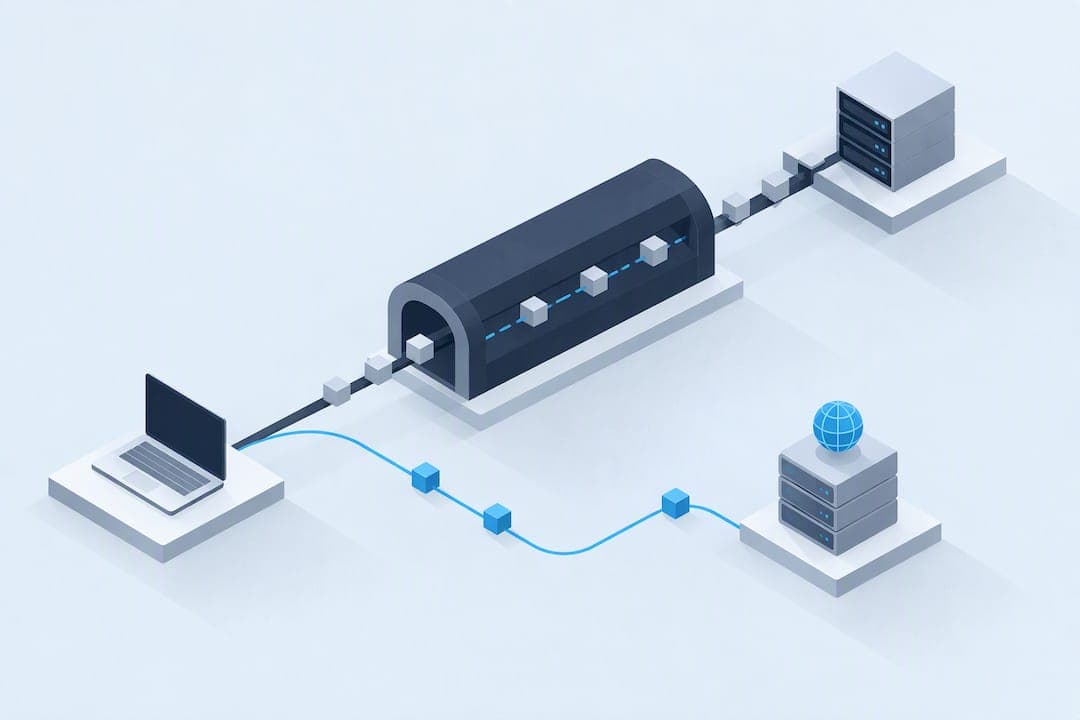
Yes, proxies and VPNs can still leak DNS lookups, and the fix usually comes down to one decision: force DNS resolution through the tunnel or a trusted proxied resolver instead of letting your operating system pick its own path. We'll walk through why this happens, how to test for it, and how we handle DNS safety on our own proxy infrastructure.
TL;DR:
- Using DNS-over-HTTPS or DNS-over-TLS improves privacy but does not ensure DNS queries route through your proxy or VPN tunnel.
- Local DNS resolution defaults in SOCKS5, browser prefetching, and ISP-level interception are common causes of leaks despite active proxy configurations.
- Testing for DNS leaks requires running multiple independent checks after each setup change, using tools like packet captures and resolver analysis.
- Fixes include forcing DNS resolution through the proxy, disabling browser prefetch, and configuring routers or clients to avoid local DNS fallback.
- Our proxy solutions offer dedicated or rotating IPs designed to maintain consistent DNS routing, crucial for predictable and private workflows.
Table of Contents
- What is a DNS leak and why does it matter?
- How proxies and VPNs handle DNS resolution
- How to test and detect a DNS leak
- Common causes and scenarios behind DNS leaks
- Step-by-step mitigation: fixes for browsers, OSs, VPNs, and routers
- Advanced troubleshooting for developers and automation
- How we approach DNS safety on our proxy network
- Convenience versus strict privacy: where to draw the line
- Getting a DNS-safe proxy setup running
- FAQ
- Sources
What is a DNS leak and why does it matter?
A DNS leak happens when your device sends domain name lookups outside your proxy or VPN tunnel, usually straight to your ISP's resolver, even though your actual web traffic routes through the proxy. The two processes are separate: DNS resolution turns a hostname into an IP address, while proxying handles the connection to that address. When they split, your ISP sees every site you visit even if your browsing traffic looks anonymous.
The privacy cost is real. A leaked query exposes the hostname you're requesting, which can reveal your approximate location, your network provider, and patterns that correlate with other traffic you thought was hidden. Recorded Future's breakdown of DNS leaks notes that misconfigured public DNS servers raise this risk considerably, since a poorly set resolver can hand your queries to the wrong party without any obvious symptom.

How proxies and VPNs handle DNS resolution
Not every proxy type treats DNS the same way, and assuming otherwise is where most leaks start.
- SOCKS4 has no built-in DNS resolution for hostnames, so the client typically resolves locally before connecting, which leaks by default unless the application handles it separately.
- SOCKS5 supports remote hostname resolution, but many clients still default to local resolution unless explicitly told otherwise.
- HTTP proxies usually pass the full URL to the proxy server, which resolves DNS on your behalf, though browser extensions and misconfigured clients can bypass this.
- VPN tunnels are supposed to route DNS through the tunnel entirely, but OS-level settings or a secondary network interface can override that and send queries out the regular connection instead.
Browser and OS defaults are the wildcard here. A transparent proxy, a stale network profile, or a browser that ignores your proxy settings for DNS can undo an otherwise correct configuration without any error message.
How to test and detect a DNS leak
Confirming a leak takes a few minutes, and you should repeat the process every time you change a setting.
- Connect to your proxy or VPN, then run two or three independent DNS leak test sites rather than one. A safe result shows only the IP addresses and resolver names tied to your proxy or VPN provider, never your ISP.
- If a test shows an unexpected resolver, note its IP and look up its ASN and country. An ISP-owned resolver or a location that does not match your proxy's exit node is your confirmation.
- For a deeper check, capture traffic directly with
tcpdumpor Wireshark while filtering for port 53 and DNS-over-TLS on port 853. Watch where those packets actually go. - Compare the destination IPs in your capture against your proxy or VPN's published DNS servers. A mismatch means local resolution is happening somewhere in the chain.
Anomalies worth investigating include queries going to your router's default gateway, a resolver IP registered to your home ISP, or DNS traffic that appears even when your proxy connection shows as active. Any of these point to transparent interception.
Pro Tip: Run your leak test immediately after reconnecting, since some leaks only appear in the first few seconds before a VPN client finishes rerouting DNS.
Common causes and scenarios behind DNS leaks
Most leaks trace back to a handful of repeat offenders.
- PAC files: a Proxy Auto-Configuration file can trigger a local DNS lookup through its
dnsResolve()function while evaluating routing rules, leaking the hostname before any proxy decision is made, according to MDN's PAC file documentation. - Browser prefetching and extensions: link prefetching, DNS caching, and poorly coded extensions can resolve hostnames outside the proxy path without your knowledge.
- SOCKS5 local-resolve defaults: some clients, including certain configurations of
curl, carry a local-resolve default that bypasses remote DNS unless you override it. - Transparent ISP proxying and router DHCP: some ISPs intercept DNS traffic at the network level regardless of client settings, and a router pushing its own DNS via DHCP can override any app-level configuration.
Matching your symptom to one of these causes saves time, since the fix for a PAC file issue looks nothing like the fix for a router pushing ISP DNS.
Step-by-step mitigation: fixes for browsers, OSs, VPNs, and routers
Work through these in order, testing after each change.
- In Firefox, set
network.proxy.socks_remote_dnstotrueinabout:configto force DNS through your SOCKS proxy instead of resolving locally. - Disable DNS prefetching in your browser's network settings if you're troubleshooting a persistent leak, since prefetch can bypass proxy rules entirely.
- In your VPN or proxy client, look for a dedicated DNS leak protection toggle, and enable it if the client is pushing its own DNS servers.
- At the router level, set a trusted DNS server manually and disable any ISP-side DNS redirection option if your router supports it.
A few additional notes make this more reliable:
- DNS-over-HTTPS (DoH) and DNS-over-TLS (DoT) encrypt the query in transit, which stops a passive observer from reading it, but they do not guarantee the query routes through your proxy tunnel, so they're a partial fix at best.
- Forcing remote resolution through your proxy or VPN remains the more complete solution compared to DoH alone.
- Router-level fixes matter most for shared networks, where individual device settings won't help if the router itself leaks.
Pro Tip: After any change, restart the network interface or browser completely rather than just reloading a page. Cached DNS resolutions can mask a leak that would otherwise show up immediately.
Checklist: change one setting, restart the affected network stack or browser, then retest with a leak test site and a packet capture before moving to the next fix.
Advanced troubleshooting for developers and automation
For scripts, browser extensions, and automated scraping setups, DNS leaks need to be caught at the code level rather than through a GUI toggle.
- WebExtensions can use the proxy API's
onRequestmethod to intercept requests and apply precise proxy and DNS policy inside the extension's own logic, which gives you control that browser settings alone don't offer. - The related
ProxyInfoobject exposes aproxyDNSflag that determines whether DNS resolution happens through the proxy, though its default behavior has shifted across browser versions, so test against your target version directly. - In automation scripts using
curlwith SOCKS5, be aware of thesocks5_resolve_localbehavior. A curl mailing list discussion confirms that some configurations resolve DNS locally by default, which means you need to explicitly request remote resolution or pass the hostname directly to the proxy. - Tracing the resolution path through application logs alongside a packet capture gives you a deterministic record of exactly where each query went, which beats guessing based on intermittent test results.
A socks5_resolve_local flag exists that causes some clients to resolve DNS locally when using SOCKS5, which can cause errors and DNS-local resolution unless overridden.
How we approach DNS safety on our proxy network
Running proxy infrastructure at scale means DNS handling has to be predictable, not an afterthought bolted on after a leak report.
- Our dedicated ISP proxies are built for workflows where consistent, provider-managed resolution matters, since a single static IP per proxy simplifies tracking down any DNS inconsistency.
- Our rotating residential proxies support sticky sessions, which helps when you need DNS anchoring to a specific exit point for the duration of a task rather than resolution bouncing between different nodes mid-session.
- Choosing between ISP, residential, or mobile proxies affects how predictable your DNS behavior will be, since each type handles routing and session persistence differently.
- When a configuration issue shows up as a DNS inconsistency rather than a connection failure, reaching out to support with your test results speeds up diagnosis considerably, since most DNS issues trace back to a client-side setting rather than the proxy itself.
Convenience versus strict privacy: where to draw the line
If you're running automation or handling sensitive data, force remote DNS resolution every time. For casual browsing, DoH plus periodic leak testing is a reasonable middle ground. Either way, retest after every configuration change.
— proxy
Getting a DNS-safe proxy setup running
If you've worked through the fixes above and want infrastructure built around predictable DNS behavior from the start, our AT&T Fresh ISP and T-Mobile Legacy ISP proxies give you a dedicated, unlimited-bandwidth IP per connection, which removes a lot of the guesswork that comes with shared or rotating setups.

For projects that need geographic targeting down to the country, state, or city level, our rotating residential proxies support sticky and rotating sessions depending on whether you need DNS and IP consistency for a single task or fresh exit points across a larger run. AT&T Fresh ISP runs $2.75 USD per month per IP, and T-Mobile Legacy ISP runs $1 to $2.50 USD per month per IP, both delivered automatically after a cryptocurrency checkout. Check our pricing page to compare options, and reach out if you need help matching a plan to a DNS-sensitive workflow.
FAQ
What causes a DNS leak when using a proxy?
A DNS leak happens when your device sends hostname lookups outside the proxy tunnel, often because of local resolution defaults in SOCKS clients, PAC file evaluation, or browser settings that bypass the proxy. PAC files specifically can trigger local DNS lookups through their routing logic before the proxy is ever used.
How do I know if my DNS is leaking?
Run two or three independent DNS leak test sites while connected to your proxy or VPN, and check whether the resolver shown matches your proxy provider rather than your ISP. For a more rigorous check, capture traffic with a tool like Wireshark and filter for DNS traffic on port 53 to see exactly where queries are routed.
Does using a SOCKS5 proxy prevent DNS leaks?
Not automatically. SOCKS5 supports remote DNS resolution, but many clients and tools still resolve locally by default unless explicitly configured otherwise, a behavior documented in discussions around curl's socks5_resolve_local setting.
Can DNS-over-HTTPS fix DNS leaks on its own?
DNS-over-HTTPS encrypts your DNS queries in transit, which stops a passive observer from reading them, but it does not guarantee the queries route through your proxy or VPN tunnel. Forcing remote resolution through your proxy remains the more complete fix when the goal is routing consistency, not just encryption.
Does NatProxies help with DNS leak configuration?
Our support team can help you match a proxy plan, whether dedicated ISP or rotating residential, to a setup that keeps DNS resolution consistent with your routing. Reach out through our pricing page if you run into a DNS inconsistency you can't trace to a client-side setting.
Sources
- DNS Leak: Concept and Mitigation Strategies — Recorded Future
- Proxy Auto-Configuration (PAC) file - HTTP | MDN
- Curl mailing list discussion about SOCKS5 local resolve