

Default to HTTP for browser automation, scraping, and anything already speaking web traffic. Switch to SOCKS5 when your client needs raw TCP or UDP for something non-HTTP, such as SSH tunnels, game clients, or database connections. Add TLS to the client-to-proxy link (HTTPS/CONNECT) whenever that hop crosses a network you don't control. None of this touches whether your final destination uses HTTPS; that stays encrypted end to end no matter which proxy protocol carries it there.
TL;DR:
- Most web traffic should default to HTTP proxies, with SOCKS5 reserved for non-HTTP protocols like SSH, UDP, or databases.
- HTTPS traffic uses the CONNECT method, which relays encrypted data without proxy insight, unlike plain HTTP where headers and paths are visible.
- SOCKS5 forwards raw bytes without understanding protocol content, making it more flexible but lacking built-in encryption, unlike HTTP proxies that support TLS in the client-to-proxy link.
- Compatibility issues, missing adapter libraries, and silent client errors are the primary risks when choosing the wrong proxy type for your application.
- Always test your exact client setup end-to-end before deploying, and encrypt proxy links crossing untrusted networks to protect credentials and data.
Table of Contents
- What Is an HTTP Proxy and How Does CONNECT Work?
- What Is SOCKS5 and How Does It Forward Traffic?
- HTTP vs SOCKS5: What Actually Differs?
- Does SOCKS5 Cost You Speed, and When Should the Proxy Link Be Encrypted?
- Which Clients Support HTTP or SOCKS5 Natively?
- How Do You Choose Between HTTP and SOCKS5?
- How Natproxies Approaches Protocol Selection
- Our Take: The Protocol Debate Misses the Real Problem
- Where to Start With Natproxies
- Sources
- FAQ
What Is an HTTP Proxy and How Does CONNECT Work?
An HTTP proxy operates at the application layer. It reads your request, understands it as HTTP, and forwards it accordingly. For plain HTTP traffic, the proxy sees everything: the path, the headers, cookies, the works. That visibility is exactly why HTTP proxies are so easy to debug and log.
HTTPS changes the picture. When your client hits a https:// URL through an HTTP proxy, it issues a CONNECT request first. The proxy opens a raw TCP tunnel to the destination, and your TLS handshake happens straight through that tunnel to the actual server. Proxydata that once CONNECT establishes the tunnel, the proxy can no longer see paths, headers, or cookies. It just relays encrypted bytes.
Authentication and common failure points to know:
- Basic and Digest auth headers are standard, but some clients strip or mishandle them across redirects.
- Corporate and residential HTTP proxies sometimes silently drop the
Proxy-Authorizationheader onCONNECTretries. - A client mismatched to the wrong proxy type (expecting SOCKS, getting HTTP) usually fails immediately rather than degrading gracefully.
What Is SOCKS5 and How Does It Forward Traffic?
SOCKS5 doesn't know or care what's inside the packets. It negotiates a connection, then forwards raw bytes at the transport layer. That's the core distinction in any http proxy vs socks proxy debate: HTTP proxies understand the protocol they carry, SOCKS5 doesn't need to.
The handshake itself is simple. The client picks an authentication method (RFC 1929 defines the username and password sub-negotiation), the proxy confirms, and then it's just a tunnel. Because SOCKS5 forwards raw TCP and optionally UDP, it can carry practically any protocol built on those transports.
That flexibility shows up in real deployments:
- SSH dynamic port forwarding (
ssh -D) routes arbitrary traffic through a SOCKS5 tunnel. - Database clients connecting to remote instances over a proxied TCP socket.
- Game clients and VoIP apps that need UDP association, which HTTP proxies simply don't offer.
- Chat and messaging apps with custom binary protocols that would break an HTTP-aware proxy.
HTTP vs SOCKS5: What Actually Differs?
The practical differences come down to four things: what traffic each protocol carries, what the proxy can see, whether the client-to-proxy hop is encrypted, and how well your tools support it out of the box.
| Dimension | HTTP Proxy | SOCKS5 Proxy |
|---|---|---|
| Supported traffic types | HTTP, HTTPS via CONNECT | Arbitrary TCP, optional UDP |
| Client-to-proxy encryption | Only inside a CONNECT tunnel | None built in; wrap in TLS or SSH separately |
| Authentication methods | Basic, Digest, custom headers | Username/password (RFC 1929), no-auth |
| Native support in tools | Browsers, curl, most HTTP libraries | curl, SSH, some libraries need adapters |
| Performance/overhead | Slightly higher parsing overhead on plain HTTP | Marginally leaner; overhead is protocol-agnostic |
| Best for | Web scraping, browser automation, API calls | Non-HTTP apps, UDP traffic, multi-protocol tools |
The CONNECT method deserves its own callout because it's the part people misunderstand most. An HTTP proxy handling CONNECT isn't reading your HTTPS traffic; it's just relaying an opaque tunnel, the same way Stack Overflow's community explains when comparing HTTP proxy vs HTTPS proxy behavior. SOCKS5 skips that ceremony entirely since it never inspects application data in the first place.
The most common mismatch failure: pointing an HTTP-only client at a SOCKS5 endpoint, or vice versa. Instead of a clean error, you often get a hang, a timeout, or a connection reset with no useful message.
Does SOCKS5 Cost You Speed, and When Should the Proxy Link Be Encrypted?
Overhead differences between HTTP and SOCKS5 are small enough that they rarely decide anything on their own. Network latency, target server response time, and how many hops your traffic takes will dominate almost every real-world benchmark you run. If your requests feel slow, look at the destination and your connection pool settings before blaming the proxy protocol.
Encryption is where the real decision lives. If your client-to-proxy link crosses public Wi-Fi, a shared SDK environment, or a corporate inspection point, wrap that hop in TLS. ProxyData.io's guidance is direct on this: once a CONNECT tunnel is up, headers, paths, and cookies stay hidden from anything sitting between client and destination.

Statistic Callout: There's no universal benchmark number for HTTP vs SOCKS5 overhead worth quoting, because it depends entirely on your stack and target. Treat any site claiming a fixed percentage difference with skepticism.
Pro Tip: Never send Proxy-Authorization credentials over an unencrypted link on a network you don't control. Pair SOCKS5 with an SSH tunnel, or use HTTPS proxies with CONNECT, whenever the hop to your proxy isn't already secured.
Which Clients Support HTTP or SOCKS5 Natively?
Adapter libraries close most gaps. Python's requests library needs the requests[socks] extra installed before it will touch a SOCKS5 endpoint; Node.js projects commonly reach for socks-proxy-agent. Skipping that step is a frequent cause of failures that look like proxy problems but are really missing dependencies.
- Test with the actual protocol you'll run in production, not a simplified stand-in.
- For SOCKS5, try an SSH tunnel or a UDP-dependent app before trusting it works at scale.
Pro Tip: Run one end-to-end test that mirrors your real traffic, whether that's an SSH tunnel or a UDP-associated game connection, before rolling a protocol choice into production.
How Do You Choose Between HTTP and SOCKS5?
Run through this decision flow before committing to either protocol:
- Is your client HTTP-native (a browser, a scraper, an API client)? Use HTTP.
- Does it need non-HTTP TCP or UDP (SSH, a database driver, a game client)? Use SOCKS5.
- Does the client-to-proxy path cross an untrusted network? Add TLS-to-proxy regardless of which you picked.
Once you've picked, verify it works before you scale it:
- Send a single test request and confirm the response.
- Confirm your authentication method actually passes (test with intentionally wrong credentials too).
- If UDP matters, confirm the proxy supports UDP association, not just TCP.
- Measure latency under realistic load, not just a cold single request.
Watch for these red flags: connections that fail silently instead of erroring clearly, credentials appearing in plaintext logs, and client libraries that claim SOCKS5 support but actually need an extra package you haven't installed yet.
How Natproxies Approaches Protocol Selection
Natproxies defaults customers toward HTTP for scraping and automation workloads run against its ISP proxies, since most scraping stacks are already HTTP-native. For non-HTTP jobs, geo-targeted sessions, or apps needing sticky IPs across a session, SOCKS5 support is available across the same infrastructure. Authentication ties to IP whitelisting or user credentials depending on setup. For deeper configuration steps, the best proxies for web scraping guide walks through practical setup choices.
Our Take: The Protocol Debate Misses the Real Problem
Most guides frame HTTP vs SOCKS5 as a philosophical choice about anonymity or speed. That's backwards. The research consistently points to one thing: silent failures from mismatched clients and missing adapter libraries cause more wasted engineering time than any protocol-level performance gap ever will. A team that picks SOCKS5 because it sounds more "raw" and then spends a day debugging why requests won't connect has made the wrong tradeoff, even if SOCKS5 was technically the better fit for their traffic.
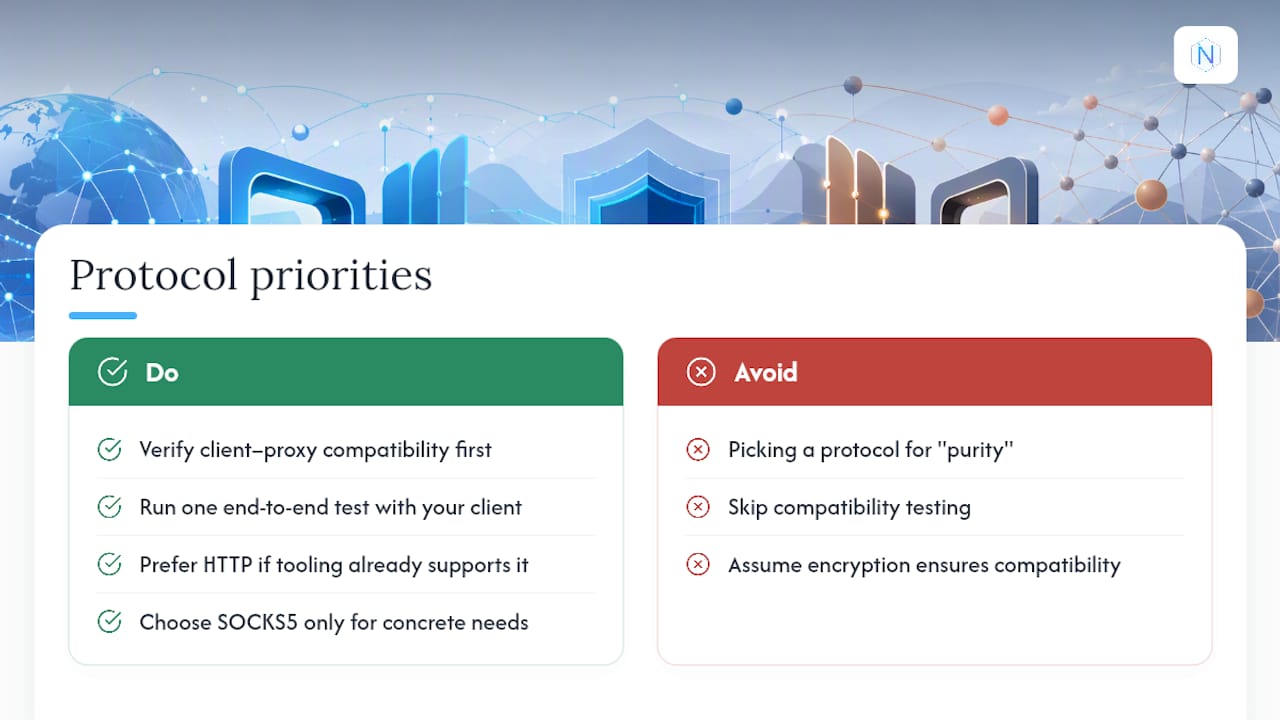
The conventional advice tells you to compare anonymity levels and encryption strength first. In practice, you should verify compatibility first, encryption second, and protocol philosophy last. HTTP proxies win by default because your tooling almost certainly already speaks HTTP. SOCKS5 earns its place only when you have a concrete non-HTTP requirement, not because it feels more technically pure.
If you take one thing from this comparison, prioritize the boring step: run one real end-to-end test with your exact client before you commit infrastructure decisions to either protocol.
— proxy
Where to Start With Natproxies
Different jobs call for different proxy types, not just different protocols. If you need consistent, dedicated IPs for account management or ad verification, ISP proxies give you per-IP reliability with unlimited bandwidth options. If you're scraping at volume across multiple regions, rotating residential proxies with country, state, and city targeting handle the scale without triggering blocks.

Both product lines support HTTP and SOCKS5 connections, so the protocol choice you made above slots in without forcing you onto different infrastructure. Payment is processed through cryptocurrency checkout with automated delivery. Check the pricing page to compare per-IP and per-GB plans against your expected volume, and confirm your use case fits Natproxies's acceptable use policy before you scale a scraping or automation job into production.
Sources
This comparison draws on ProxyData.io's technical explainer, Nodetonet's protocol guidance, and Stack Overflow's community discussion on HTTP versus HTTPS proxy behavior. For setup help, see Natproxies's guide on ISP vs residential vs mobile proxies.
FAQ
What Is the Difference Between HTTP and SOCKS Proxies?
HTTP proxies understand and parse HTTP traffic, reading paths and headers unless the connection is tunneled through CONNECT for HTTPS. SOCKS proxies forward raw TCP (and optionally UDP) bytes without inspecting the protocol inside, which is why SOCKS5 works with non-HTTP apps like SSH and database clients.
Is SOCKS5 Better Than an HTTP Proxy?
Neither is universally better; it depends on what you're running. HTTP wins for browser automation and scraping because it's widely supported and easier to debug, while SOCKS5 wins when your client needs raw TCP, UDP, or a non-HTTP protocol.
Should You Turn On an HTTP Proxy for Everyday Browsing?
Turn one on if you need IP targeting, geo-restricted access, or traffic separation for a specific tool or account. For general privacy on public networks, pairing your proxy with TLS/CONNECT matters more than the proxy type itself, since that's what keeps headers and paths hidden in transit.
What Are the Disadvantages of SOCKS5?
SOCKS5 has no built-in encryption of its own, so credentials and data can travel in plaintext unless you wrap the connection in something like SSH or TLS separately. It also requires adapter libraries in some stacks, such as requests[socks] for Python or socks-proxy-agent for Node.js, which adds a setup step HTTP proxies usually skip.
Which Proxy Type Does Natproxies Recommend for Scraping?
Natproxies generally points scraping and automation workloads toward HTTP on its ISP proxy infrastructure, since most scraping tools are already HTTP-native. SOCKS5 remains available for non-HTTP use cases across the same proxy pool.