

Favor session-aware rotation for most scraping and automation work: pair a browser fingerprint and cookie set with one IP, keep that pairing until you see a real block signal (a 403, a 429, a challenge page), then switch. Save per-request rotation for stateless public pages, and reserve large residential pools for hostile, geo-restricted targets where the anonymity trade-off justifies the bandwidth cost. ISP static and rotating residential proxy lines map directly to those two poles.
TL;DR:
- Pair a browser fingerprint and cookie set with the same IP and only switch IPs when receiving explicit block signals like 403 or 429 errors.
- Use per-request rotation for public, stateless pages and reserve residential pools for high-volume, hostile, or geo-restricted targets.
- Implement session-aware rotation with sticky sessions during login or checkout flows, keeping the same IP until a verified block occurs.
- Verify geolocation with ASN and geolocation checks before relying on an IP for region-specific content.
- Avoid rotating IPs too frequently or blindly, as pattern detection by anti-bot systems often flags excessive or inconsistent IP switching.
Table of Contents
- What Are the Main IP Rotation Modes?
- When Should You Use Each Rotation Strategy?
- Implementation Best Practices for Rotation That Holds Up
- Proxy Types and Their Trade-Offs
- What Detection Signals and Pitfalls Should You Watch For?
- How NatProxies Supports These Rotation Strategies
- What Is IP Rotation and Why Does It Matter?
- What Are the Legal and Ethical Boundaries of IP Rotation?
- Does IP Rotation Affect Site Performance and User Experience?
- How Does IP Rotation Fit With Other Anonymity Tools?
- What Advanced Rotation Algorithms Are Worth Knowing?
- How Do You Keep Sessions Alive While Rotating IPs?
- What the Rotation Playbook Gets Wrong Today
- Get Session-Aware Rotation Running With NatProxies
- Sources
- FAQ
What Are the Main IP Rotation Modes?
IP rotation just means cycling through a pool of addresses so a target site sees traffic from many sources instead of one. How you cycle them is where most implementations go wrong.
- Per-request rotation swaps the IP on every call. It works for stateless public pages that don't track sessions, like a product listing you're scraping once. Most rotating gateway providers handle this automatically; manual pools need a random selector with no repeating pattern.
- Sticky sessions (session pools) hold one IP for the life of a login, cart, or multi-step form. Session TTLs typically run from a few minutes to a few hours depending on the target's own session timeout. Production rotation architectures treat sticky sessions and session pools as a core pattern precisely because logins and checkouts break the moment the IP changes mid-flow.
- Time-based rotation swaps IPs on a fixed clock (every 10 minutes, every hour) regardless of what's happening. It's simple to build but has limited real value: it rotates for no reason when nothing is wrong and fails to rotate fast enough when something is.
- Geo-targeting matters whenever content varies by region. A provider's "US" label on an IP isn't proof; verify it with ASN and geolocation checks before trusting it for geo-restricted jobs.
When Should You Use Each Rotation Strategy?
Strategy choice depends on target defenses, volume, and whether geography matters. Here's the practical mapping:
- Small, non-hostile targets — a single IP with polite throttling often works fine. Residential pools aren't necessary for most moderate-volume jobs. Self-hosted VPS rotation across a few egress points covers plenty of lightly defended sites for free.
- Moderate volume, rate-limited targets — a provider rotating gateway or a session pool with randomized round-robin and jitter keeps request patterns from looking mechanical, per the production rotation patterns used across scraping infrastructure.
- Hostile, high-volume targets with anti-bot systems — residential or mobile pools paired with block-driven session switching, sometimes combined with a scraping API layer that handles retries and CAPTCHAs upstream.
- Geo-restricted content — true geo-targeted IPs, confirmed by ASN lookup, not just a provider's country label. Checking against ISP, residential, and mobile options helps you figure out which category actually delivers the geography you're paying for.
Implementation Best Practices for Rotation That Holds Up
The gap between rotation that works and rotation that gets you flagged comes down to a handful of operational rules, not clever code.
Identity pairing is the one most teams skip. Bind a browser fingerprint and cookie jar to a single IP and keep them together until a verified block, not a timer, triggers the switch. Blind per-request rotation without fingerprint rotation produces a stronger bot signal than staying on one IP, because modern anti-bot systems correlate TLS and browser fingerprints with IP geography. When your fingerprint teleports from Ohio to Singapore between two requests, that's the tell, not the rotation itself.
Block detection needs explicit rules: log every 403, 429, CAPTCHA redirect, and any silent content change (a login wall where a product page should be). Don't lump network timeouts in with blocks. They're different problems with different fixes.
Health checks and cooldowns keep dead weight out of your pool. Mark a proxy dead after a set run of consecutive failures, quarantine it after repeated blocks, and give residential IPs behind aggressive firewalls a 24 to 72 hour cooldown before reuse.
Backoff should be exponential, not linear. Retry once after rotating to a fresh IP; never hit the same blocked IP again immediately.
Concurrency caps per IP, plus randomized round-robin with jitter, prevent the deterministic timing patterns that trip rate limiters. Session pool configurations like maxUsageCount let you retire a session automatically after a set number of uses instead of guessing.
- Cap concurrent requests per IP (start conservative, tune from block-rate data).
- Randomize timing between requests, not just IP selection.
- Partition session pools by target domain so one site's blocks don't burn IPs meant for another.
Pro Tip: Log every block by proxy ID, target domain, and timestamp in one table. After a week you'll see which proxies or subnets are getting flagged fastest, and you can quarantine them before they drag down your whole pool's success rate.
Proxy Types and Their Trade-Offs
Rotation strategy only works as well as the proxy pool underneath it. The three main categories behave very differently under pressure.
- Datacenter proxies are cheap and fast, but entire ASN ranges get blocklisted once a few IPs misbehave. They're a good fit for easy targets or a self-hosted rotation setup across your own VPS instances.
- Residential proxies carry real ISP reputation, which makes them far harder to flag, but cost and latency both climb. They're worth the premium for hostile targets or jobs that require accurate geography, not for scraping a public blog.
- Mobile proxies rotate IPs constantly because carriers reassign addresses to real devices, which gives you fast, forced rotation with strong trust signals.
- ISP static proxies sit in the middle: residential-grade reputation with the stability of a fixed IP, ideal for sessions that need to persist for hours or days.
Bandwidth billing is the trap. Residential pricing runs per gigabyte, and a scraping job that seemed cheap in testing can blow past budget fast at scale. Test on a small sample before committing to a monthly volume.
What Detection Signals and Pitfalls Should You Watch For?
The most common failure mode isn't under-rotating. It's rotating badly. Swapping IPs every single request while keeping the same fingerprint, cookies, and request headers creates a pattern that's easier for anti-bot systems to flag than not rotating at all. Deterministic cycles (IP A, B, C, A, B, C) are just as bad, since pattern detection is a solved problem for most WAFs.
Real block signals: 403 and 429 status codes, redirects to a CAPTCHA or challenge page, and content that quietly shifts (a login wall instead of your expected data). A DNS timeout or connection reset usually means a dead proxy, not a block. Confusing the two wastes cooldown cycles on proxies that were never flagged in the first place.
- Run a session simulation before going live: log in, browse, and check out on one IP to confirm state doesn't break.
- Verify claimed geography with an ASN and geolocation lookup, not the provider's label.
- Track block rate per proxy over rolling 24 hour windows, not just lifetime totals.
Nearly one in three scraping failures traced back to session mismatches rather than outright IP blocks in one architecture review of production rotation setups, which is exactly why session pairing gets more attention here than raw rotation frequency.
How NatProxies Supports These Rotation Strategies
Two product lines map cleanly onto the strategies above. Dedicated static ISP proxies with unlimited bandwidth per IP are built for the sticky session use case: logins, account management, and any workflow where the IP needs to hold steady for hours. Rotating residential proxies cover the hostile, high-volume, or geo-restricted side, with country, state, and city targeting and no data expiration on the plan.
For deeper configuration walkthroughs, the best proxies for web scraping guide and the ad verification proxy guide both cover setup patterns beyond what fits here.
What Is IP Rotation and Why Does It Matter?
IP rotation is the practice of routing outbound requests through a changing set of IP addresses instead of one fixed address, so a target server sees traffic distributed across many sources rather than a single client hammering it repeatedly. The core reason to do it is simple: most websites rate-limit or block by IP once request volume or behavior looks automated.
The bottom line up front, if you take nothing else from this guide: rotation isn't about hiding constantly. It's about having a fresh identity ready the moment your current one gets burned. A pool sitting idle while one IP works fine is doing its job. A pool cycling constantly while nothing is wrong is just adding noise, and often adding risk, since a browser fingerprint that jumps IP on every call looks more suspicious to fingerprinting systems than one that doesn't move at all.
This is also where the terminology gets muddled. "Rotating proxies," "dynamic IP strategies," and "IP address management" all describe the same underlying discipline: deciding when an identity should keep its current IP and when it should get a new one. The decision engine behind that choice, whether it's a simple counter or a full session pool manager, is the actual product you're building or buying. The IPs themselves are just inventory.
What Are the Legal and Ethical Boundaries of IP Rotation?
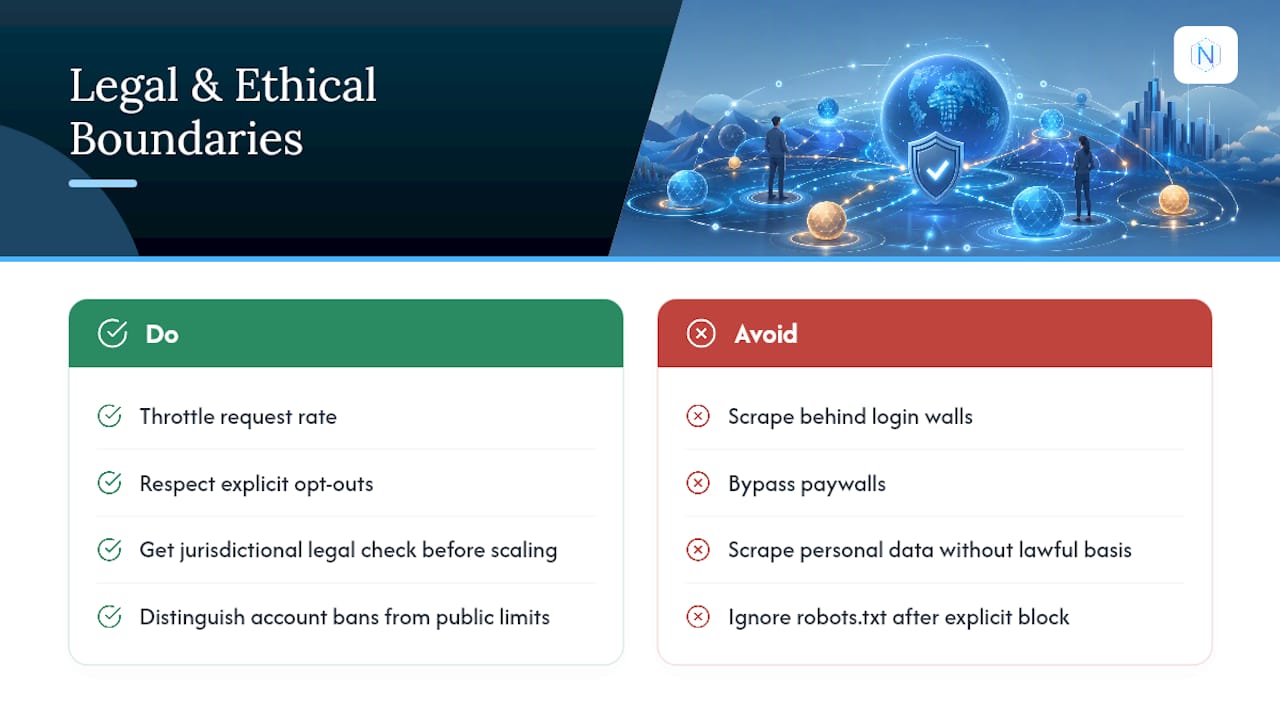
Using proxies and rotating IPs is not illegal in itself in most jurisdictions; it's a standard networking technique used by CDNs, security researchers, and QA teams as much as by scrapers. What crosses into legal risk is what you do with the access, not the rotation mechanism.
Scraping data behind a login wall, bypassing paywalls, violating a site's terms of service, or scraping personal data without a lawful basis under regulations like the EU's GDPR are the actual risk points, not the act of using multiple IPs. A site's robots.txt file isn't legally binding everywhere, but ignoring it after a target has explicitly blocked your traffic pattern removes any argument that access was accidental or good faith.
The ethical line worth holding yourself to: throttle your request rate to something a target's infrastructure can absorb without degrading service for real users, respect explicit opt-outs, and never use rotation to evade a block that exists because of a documented terms violation on an account you control. Rotating around a ban on your own account is different from rotating around a public rate limit on open data. Treat those as separate risk categories, because regulators and courts increasingly do too.
If your use case touches personal data, financial information, or anything behind authentication, get a specific read on the relevant jurisdiction's rules before scaling. General guidance in an article like this one is not a substitute for that check.
Does IP Rotation Affect Site Performance and User Experience?
Poorly implemented rotation creates real performance costs on both sides. On your end, switching proxies mid-session breaks state, forces re-authentication, and can double or triple your request count as failed sessions retry from scratch. Residential and mobile proxies also add latency versus datacenter IPs, sometimes by a meaningful margin, because traffic routes through real consumer networks instead of a data center backbone.
On the target's end, aggressive rotation combined with high concurrency can look indistinguishable from a low-grade denial-of-service pattern, even when that's not the intent. A site under that kind of load starts serving CAPTCHAs to legitimate users too, which is part of why WAFs get more aggressive the more erratic your traffic pattern looks.
The fix is the same rule that runs through this entire guide: rotate on signal, not on schedule. A session that holds one IP for its natural lifetime generates one clean request pattern. A session that hops IPs every few seconds generates a pattern that looks like an attack, forces retries, and slows down your own pipeline more than it protects it. Concurrency caps per IP and jittered request timing aren't just anti-detection tactics. They're what keeps your scraper's own throughput predictable.
How Does IP Rotation Fit With Other Anonymity Tools?
Rotation is one layer in a stack, not the whole defense. Pairing it with the wrong layers can cancel out its benefit entirely.
Browser fingerprint randomization needs to move in sync with IP changes, not independently. If your user agent, screen resolution, and TLS handshake stay frozen while the IP changes every few minutes, you've created the exact mismatch that fingerprinting systems are built to catch. Headless browser configurations (Playwright, Puppeteer) should rotate fingerprint attributes on the same trigger as the IP: a verified block, not a timer.
Cookie and session state management matters just as much. Clearing cookies on every rotation defeats the purpose of a sticky session; keeping them stale after a real block does too. The two need to reset together.
VPNs and Tor are generally the wrong tool for this job. Tor exit nodes are widely blocklisted by commercial anti-bot systems, and consumer VPN IP ranges are frequently flagged the same way datacenter proxies are. Dedicated proxy infrastructure, whether residential, ISP static, or mobile, generally outperforms both for scraping and automation specifically because the IP reputation is built for sustained, legitimate-looking traffic rather than one-off privacy use.
What Advanced Rotation Algorithms Are Worth Knowing?
Beyond basic round-robin, a handful of algorithmic patterns show up repeatedly in production systems.
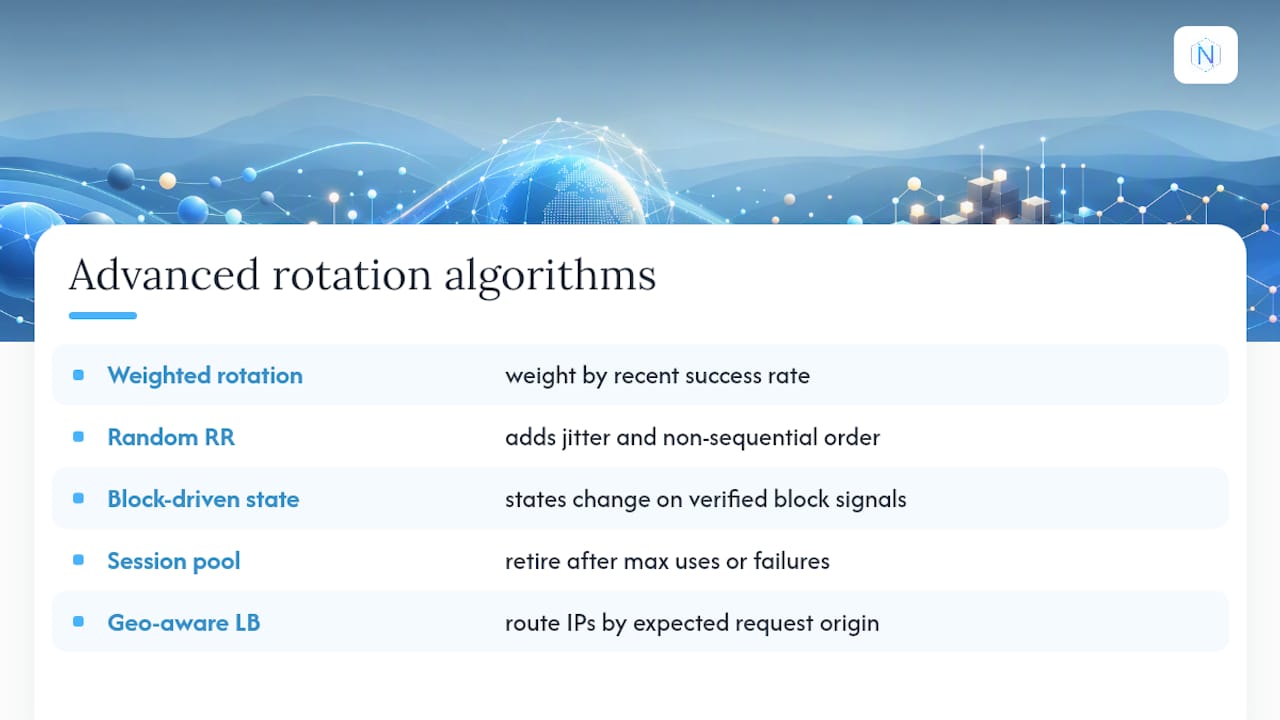
Weighted rotation assigns selection probability based on a proxy's recent success rate, so IPs with clean histories get used more often than ones sitting near a quarantine threshold. Randomized round-robin with jitter avoids the predictable A-B-C-A-B-C cycle that pattern-matching systems catch quickly, adding small random delays and non-sequential selection order.
Block-driven state machines are the most effective pattern this guide recommends: each identity (fingerprint plus IP plus cookie set) moves through states, active, flagged, cooling down, retired, with transitions triggered only by verified block signals rather than fixed timers. Session pool tools with maxUsageCount settings implement a version of this automatically, retiring a session after a set number of uses or a failure threshold, whichever comes first.
Geo-aware load balancing routes requests to the IP pool matching the target's expected traffic origin, useful for ad verification and localized SEO checks where the wrong geography invalidates the whole request. None of these need custom infrastructure. Provider gateway and session API patterns already expose most of this through configuration rather than code you have to write yourself.
How Do You Keep Sessions Alive While Rotating IPs?
Session persistence and IP rotation pull in opposite directions by nature, and reconciling them is the hardest part of building a reliable scraper.
The core challenge: a login session, shopping cart, or multi-step form typically ties to a server-side session token that's often bound, directly or indirectly, to the client IP that created it. Rotate the IP mid-session and the server sees a mismatch, sometimes silently degrading the response, sometimes forcing a fresh login.
The practical solution is sticky sessions scoped to session TTL, not to a fixed timer that ignores what the target actually needs. Match your session length to the target's own timeout behavior: a checkout flow that expires after 20 minutes of inactivity needs an IP held for at least that long. Session pool architectures solve this by partitioning proxies into pools scoped to specific tasks, so a checkout-flow pool never gets touched by a pool running simple page fetches.
Cart and login flows are the highest-risk case. If you're seeing checkout tasks fail mid-flow, the common causes of failed checkout automation usually trace back to an IP switching at exactly the wrong step, not a proxy quality issue. The fix is almost always tightening the sticky window, not switching proxy providers.
What the Rotation Playbook Gets Wrong Today
Most guidance on this topic treats rotation frequency as the whole strategy: rotate fast, rotate often, buy a bigger pool. That advice made sense five years ago against simpler rate limiters. It's actively counterproductive against modern fingerprinting, where a fresh IP with the same stale cookies and same browser signature is a louder signal than staying put.
The uncomfortable truth is that pool size and rotation speed are the parts everyone obsesses over, and the coordination between identity and IP is the part almost nobody builds correctly. A team running ten residential IPs with tight session pairing and real block detection will outlast a team burning through a thousand IPs on a fixed timer. Budget goes to the wrong line item constantly: more proxies instead of better logging.
If you're starting from scratch, build the block detection and cooldown logic first. Buy the proxy pool second. Most failures we'd trace back to strategy actually trace back to teams that never instrumented what a block even looked like on their specific target, so they're rotating blind. Session pairing without measurement is just a guess with extra infrastructure.
— proxy
Get Session-Aware Rotation Running With NatProxies
NatProxies is built around exactly the two rotation strategies this guide recommends: sticky-session stability and hostile-target rotation, without forcing you into one-size-fits-all infrastructure. If your work needs an IP to hold steady through a login or checkout flow, AT&T Fresh ISP and T-Mobile Legacy ISP deliver dedicated static ISP proxies with unlimited bandwidth, priced per IP starting around $2.75 per month for AT&T Fresh and $1 to $2.50 per month for T-Mobile Legacy.

If your target is hostile or geo-restricted, Rotating Residential proxies give you country, state, and city targeting with sticky or rotating session options and no data expiration, billed per gigabyte with pricing available on request. Cryptocurrency checkout means provisioning happens automatically, no waiting on manual setup between paying and running your first session. Check current pricing and plans or browse the residential proxy details to match a plan to your target before you commit to a monthly volume.
Sources
- Proxy Rotation & Residential IPs: When You Need Them | fastCRW
- IP Rotation Architecture: A Practical Guide | Empirium
- Rotating Proxies Safely in Browser Automation | ThinkGenius
FAQ
What Is the Best IP Rotation Strategy for Web Scraping?
Session-aware rotation, pairing a fingerprint and cookies to one IP until a verified block occurs, works better for most scraping jobs than rotating every request. Blind per-request rotation actually produces stronger bot signals than staying on one IP with a consistent identity.
How Often Should You Rotate Proxies?
Rotate on a block signal, not a fixed schedule. A sticky session should hold as long as the target's own session timeout allows, while stateless page fetches can rotate per request without any session concerns.
What's the Difference Between Datacenter, Residential, and ISP Static Proxies?
Datacenter proxies are cheap and fast but easy to blocklist by ASN range. Residential proxies carry real consumer IP reputation at higher cost and latency, and ISP static proxies combine residential-grade trust with a fixed address for long-lived sessions, a distinction covered in more depth in the ISP versus residential versus mobile comparison.
How Do You Detect an IP Block Versus a Network Error?
A block typically shows up as a 403 or 429 status code, a CAPTCHA redirect, or content that silently changes to a login wall. A connection timeout or DNS failure usually points to a dead proxy rather than a block, and treating the two the same wastes cooldown time on proxies that were never flagged.
Does NatProxies Support Sticky Sessions for Rotation?
Yes. NatProxies' dedicated static ISP proxies (AT&T Fresh ISP and T-Mobile Legacy ISP) hold a fixed IP suited to sticky sessions, while its Rotating Residential proxies support both sticky and rotating session modes with country, state, and city targeting for hostile or geo-restricted targets.