

Start with rotating residential proxies set to city-level geo-targeting for most Google SERP scraping and rank tracking, and switch to static ISP proxies when a task needs a persistent, browser-based session. Residential IPs deliver accurate, location-specific search results with fewer CAPTCHAs and higher success rates than datacenter alternatives. Proxy providers offer both residential and ISP proxies built for these two jobs.
TL;DR:
- Using rotating residential proxies with city-level geo-targeting is ideal for high-frequency rank tracking, despite higher bandwidth costs and CAPTCHA risks.
- Static ISP proxies are best suited for local pack verification and workflows requiring persistent, location-verified sessions, though setup takes longer.
- Datacenter proxies are cost-effective for non-Google targets but tend to trigger more CAPTCHA and blocks when used for search engine scraping.
- Proper proxy testing involves running small-scale benchmarks across target cities to measure success and CAPTCHA rates before committing larger budgets.
- Verifying proxy targeting depth and performance through trial runs beats relying solely on vendor claims, reducing waste and improving data trustworthiness.
Table of Contents
- Starter Configurations You Can Deploy Today
- Which Proxy Type Fits Which SEO Task?
- How Do You Evaluate a Proxy Provider Before Buying?
- Deployment Practices That Keep Your Data Clean
- How Natproxies Maps to These Configurations
- The Real Lesson Buried in Most Proxy Advice
- Get Set Up With the Right Proxy Configuration
- Sources
Starter Configurations You Can Deploy Today
Pick the setup that matches the job, not the other way around. Google alone handles a staggering volume of queries every day, and that scale is exactly why robust proxy infrastructure matters once you're pulling SERPs at any real frequency. Below are three configurations worth testing this week.
Starter Config A: rank tracking at scale. Use rotating residential proxies with city-level geo-targeting and short session rotation, billed per GB. Expect low CAPTCHA rates but higher bandwidth costs, especially if you're tracking thousands of keywords across multiple markets. This is the default setup for agencies running weekly or daily rank pulls across client portfolios.
Starter Config B: local pack and local SEO audits. Use static ISP proxies with sticky sessions, verified at the ISP or ASN level rather than just the city level. Setup takes longer because you need to confirm the IP's actual carrier assignment, but reliability for local pack verification improves noticeably once you do. Geo-targeting depth at the ISP or ASN level is what separates a rough local estimate from a result you can actually trust.
Starter Config C: high-volume lightweight crawling. Use datacenter proxies with aggressive rotation for non-Google targets, and cache everything you can. This keeps costs low, but CAPTCHA and block risk climbs fast the moment you point datacenter IPs at a search engine.
To validate any of these before committing budget, run a small test:
- Pick 10 target cities relevant to your campaigns.
- Run 100 queries per city through the configuration you're testing.
- Log the success rate and CAPTCHA frequency for each city.
- Compare results against your current setup before switching providers.
Ten cities and a thousand queries won't take long, and the numbers will tell you more than any vendor's sales page.
Which Proxy Type Fits Which SEO Task?
The proxy type you choose determines whether your data is trustworthy or noise. Here's how the four main types actually perform once you put them to work on real SEO tasks.

Residential proxies route traffic through IP addresses assigned to real home internet connections, which is exactly why Google treats them like a normal visitor. Residential proxies produce lower CAPTCHA frequency and higher localization accuracy than datacenter proxies when scraping Google SERPs, and that gap is the main reason they cost more per GB. If your rank tracking data feeds client reports or pricing decisions, the accuracy premium pays for itself.
ISP proxies (sometimes called static residential) sit in a useful middle ground: they carry the ISP-assigned legitimacy of a residential IP but stay fixed, so you can hold a session open. That matters for local pack verification, where you need to check the same location repeatedly without the IP shifting mid-check, and for any workflow requiring persistent login state.
Datacenter proxies are the cheapest option per IP, and they work fine for scraping non-search targets, competitor sites, or content that doesn't sit behind aggressive bot detection. Point them at Google, though, and block rates climb quickly. Datacenter IPs are easy for search engines to flag in bulk because they cluster on identifiable hosting ranges.
Mobile proxies route through actual carrier networks (4G/5G), which matters when you're checking mobile-first indexing behavior or SERP features that render differently on mobile devices. They're overkill for desktop rank tracking but essential if mobile SERP behavior is the thing you're actually measuring.
Pro Tip: Match the proxy type to the sensitivity of the target, not to your total budget. Reserve residential or ISP IPs for Google itself, and let cheaper datacenter pools handle everything else you're scraping.
Geo-targeting precision compounds these differences. Country-level targeting is fine for broad market checks, but it's not enough for local SEO. City and ASN-level targeting materially affects rank-tracking accuracy, particularly for local pack results where Google's ranking signals are hyperlocal by design. A proxy that claims "city targeting" but can't confirm ASN alignment is giving you an approximation, not a verified location.
One more distinction worth flagging: proxy strategy should match the task rather than defaulting to one proxy type for everything. Teams that try to run all their scraping through a single pool almost always overpay for low-risk tasks or underpay (in reliability) for high-risk ones. A closer look at how ISP, residential, and mobile proxies stack up against each other is worth reading before you commit to a single vendor contract.
How Do You Evaluate a Proxy Provider Before Buying?
Run a real benchmark before you sign anything longer than a month. Vendor claims about pool size and success rate are marketing copy until you've tested them against your own targets.
Work through this checklist first:
- Geo coverage matrix. Does the provider offer country, state, and city targeting, and can they confirm ASN-level assignment where you need it?
- Pool size and freshness. A large IP count means little if most of the pool is stale or already flagged. Ask how often IPs rotate into and out of the pool.
- Session modes. Confirm both sticky and rotating session support, since different SEO tasks need different session behavior.
- Authentication methods. Look for both IP whitelisting and user/password auth, since some scraping stacks only support one.
- API stability and documentation. If you're integrating with a rank tracker or custom scraper, thin or outdated docs will cost you engineering hours later.
- Bandwidth and pricing structure. Understand whether you're billed per IP, per GB, or a hybrid, and what happens when you exceed your plan.
- Uptime and SLA terms. Ask what guarantee, if any, backs their uptime claim.
- Acceptable use policy clarity. A vague or missing AUP is a sign the provider hasn't thought through compliance, which becomes your problem later.
Once the checklist clears, run a 48 to 72 hour trial with three benchmarks: per-city success rate, average latency per request, and CAPTCHA rate per 1,000 requests. Calculate cost per successful SERP pull, not just cost per GB, since that's the number that actually reflects value.
Pro Tip: If your CAPTCHA rate exceeds roughly 5 to 10 percent of requests during a trial, treat that as a signal to slow rotation frequency or switch proxy types before you scale spend, not after.
If success rates come back low, don't assume the provider is bad. Try slower rotation, longer session TTLs, or a different city subset before writing off the vendor entirely. Sometimes it's the request pattern, not the proxy pool.
Watch for these red flags during evaluation: inflated total IP counts that don't hold up under city-level testing, "city targeting" that's actually just country targeting with a label, an AUP that's missing or written in vague legal language, and no trial or sample access offered at all. Free or public proxies fail production SEO workflows almost every time because they're overused, frequently logged, and blocked at a rate that makes the data worthless. If a provider's pricing looks suspiciously close to free, that's usually the explanation.
Deployment Practices That Keep Your Data Clean
Getting the proxy type right is half the job. How you deploy it determines whether you're actually collecting usable data or quietly burning budget on failed requests.
Rotation strategy should match the task, not a fixed rule. Per-request rotation works well for high-volume keyword scraping where each query is independent. Sticky sessions matter when you need to hold state, like checking a local pack result that requires multiple steps on the same session. As a starting point, keep session TTLs short (under a few minutes) for pure scraping and longer for anything involving login or cart-style state.
Browser fingerprinting trips up more scraping setups than proxy quality does. Real, full browser instances handle complex SERPs (with dynamic rendering, JavaScript-heavy features, and rich snippets) far better than lightweight HTTP requests. Match your user agent and cookie behavior to a real browser session, and avoid headless flags that flag your automation as a bot before the proxy even gets tested.
CAPTCHA handling needs a clear decision tree. Detect the CAPTCHA, back off rather than retrying immediately, and decide in advance whether you'll solve it, skip that query, or pause the whole batch. Retrying too fast after a CAPTCHA usually triggers a harder block, not a pass.
Cost optimization comes down to a few habits:
- Cache SERP results for queries you don't need refreshed daily.
- Block unnecessary page assets (images, ads, trackers) when you only need the rendered text.
- Route non-search targets through cheaper datacenter pools.
- Mix proxy types by task rather than running one pool for everything, since reserving residential or ISP proxies for Google-sensitive work while using datacenter IPs elsewhere is one of the more reliable ways to control spend.
Monitoring closes the loop. Log success rate, latency, and CAPTCHA frequency per proxy pool, and set alert thresholds so a degrading pool gets flagged before it quietly wrecks a week's worth of rank data. Automatic failover to a backup pool, even a small one, prevents a single bad batch from becoming a bad report to a client.
If your team would rather skip managing rotation and CAPTCHA handling directly, a managed scraping API can remove that engineering overhead, though it comes with less control over the exact proxy mix. Teams running proxy-driven outreach or lead workflows alongside SEO work sometimes pair this with CRM email integration tools to keep scraped data flowing into the same pipeline as their other campaign data.
How Natproxies Maps to These Configurations
Every configuration above needs a proxy product behind it, and Natproxies covers the three that matter most for SEO work.
- Static ISP proxies for sticky sessions and local pack verification, with unlimited bandwidth and multiple authentication options.
- Rotating residential proxies with country, state, and city targeting for broad SERP scraping and rank tracking.
- Mobile 4G/5G proxies for mobile-specific SERP checks and app-related search behavior.
| SEO task | Recommended Natproxies product | Why it fits |
|---|---|---|
| Rank tracking at scale | Rotating residential | Geo-targeting by country, state, or city with per-GB billing |
| Local pack verification | Static ISP | Sticky sessions and persistent IPs for repeat checks |
| Mobile SERP checks | Mobile 4G/5G | Real carrier-network behavior for mobile-first indexing |
| High-volume non-Google crawling | ISP proxy (billed per IP) | Unlimited bandwidth keeps large jobs cost-predictable |
Before committing to a plan, review the ISP proxy product page and the rotating residential product page to confirm the auth methods and targeting depth match your stack, then run the 48 to 72 hour benchmark described earlier against your own target list. That test, not a features page, is what actually tells you whether a proxy pool will hold up at your query volume.
The Real Lesson Buried in Most Proxy Advice
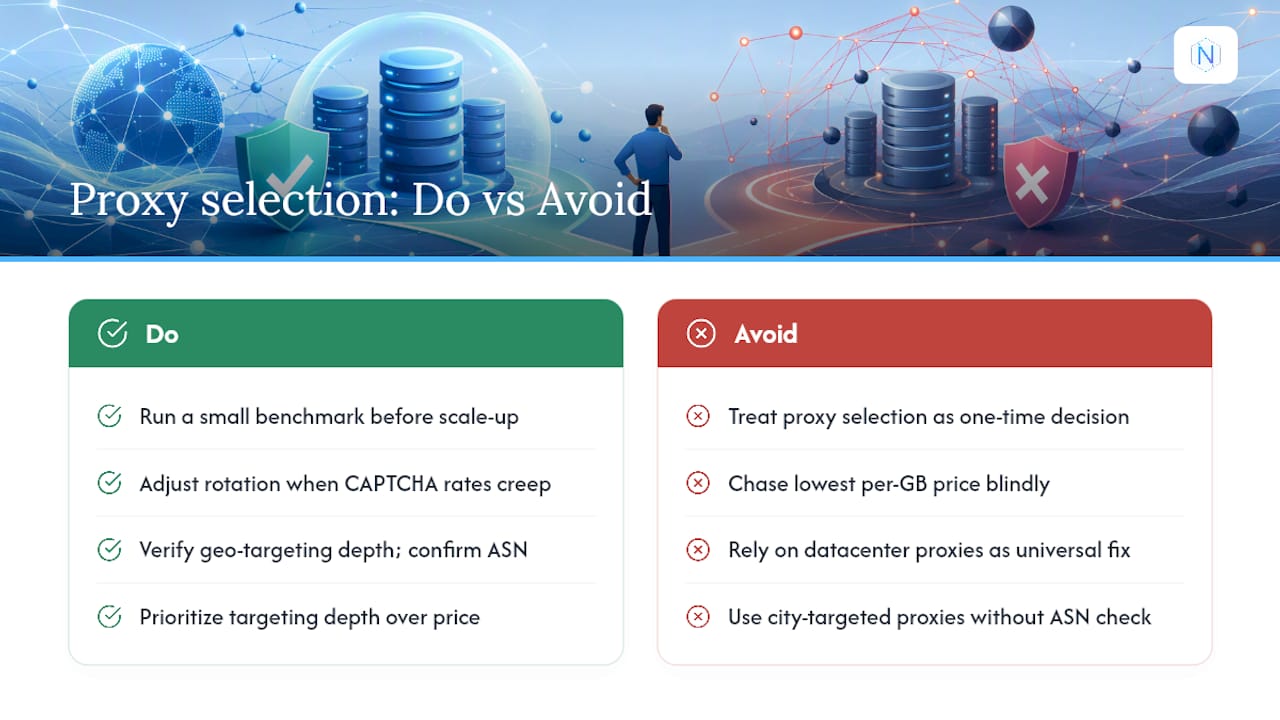
Most proxy guides treat proxy selection as a one-time decision: pick a type, buy a plan, move on. That's backwards. The teams getting clean rank data aren't the ones with the biggest IP pool. They're the ones running a small benchmark before every meaningful scale-up and adjusting rotation speed when CAPTCHA rates creep.
The conventional advice oversells datacenter proxies as a universal budget fix and undersells how much geo-targeting depth actually matters. A "city-targeted" proxy that can't confirm ASN alignment is giving you a guess dressed up as data. If you take one thing from this guide, prioritize verifying targeting depth over chasing the lowest per-GB price. Cheap data you can't trust costs more than expensive data you can.
— proxy
Get Set Up With the Right Proxy Configuration
Some providers offer rotating residential proxies with country, state, and city targeting for broad SERP scraping, plus static ISP proxies with unlimited bandwidth for sticky, persistent sessions for local pack verification.

If you've been running rank tracking through a single datacenter pool and wondering why CAPTCHA rates keep climbing, that's the mismatch this guide walked through: the wrong proxy type for a Google-sensitive task. Some providers support multiple authentication methods to plug into existing rank tracking or scraping stacks without rebuilding your pipeline. Payment can run through cryptocurrency checkout with automated delivery, so there's typically no waiting period between purchase and first request. Before scaling anything, check the acceptable use policy so your workflow stays within provider terms, then compare plans on the pricing page and run the benchmark test from this guide against your own target cities.