

Identify which blacklists have flagged your IP, then stop the offending traffic before you request anything. Delisting requests submitted while the abuse is still happening get rejected almost every time. Fix the root cause first, prioritize Spamhaus and Barracuda since major providers lean on their feeds, and only then file removal requests in that order.
TL;DR:
- Most blacklist removals are quick for automatically delisted lists like Spamhaus XBL or Spamcop once offending traffic stops; manual reviews, such as Spamhaus SBL, take 24 to 72 hours or longer.
- Root causes such as compromised hosts, open relays, or bad sending practices must be fixed before requesting delisting, including reviewing logs, closing relays, and ensuring proper email authentication records.
- Prioritize delisting requests in order from Spamhaus and Barracuda first, waiting for a clean traffic window to avoid rejection, and provide detailed evidence and remediation steps in each request.
- Recheck IP status 24 to 72 hours after remediation and monitor regularly for at least a month, using complaint feedback and automated alerts to detect recurring issues early.
- Using static ISP proxies for high-trust tasks, combined with good hygiene and behavior protocols, can help prevent blacklisting while remediating existing issues.
Table of Contents
- How Do You Identify Which Blacklist Flagged Your Proxy?
- What Root Causes Must You Fix Before Requesting Delisting?
- What's the Right Order for Submitting Delisting Requests?
- How Do You Confirm You're Actually Delisted?
- Proxy Pool Hygiene: When to Isolate, Rotate, or Retire an IP
- Should You Remediate or Migrate to a New IP?
- A Practical Next Step: Reducing Repeat Listings With NatProxies
- Sources
- FAQ
How Do You Identify Which Blacklist Flagged Your Proxy?
Run a multi-list lookup before touching anything else. Tools that query dozens of DNSBLs at once will return which specific lists flagged your IP and the stated reason, and that reason determines your next move entirely. A multi-list IP blacklist checker is faster and more reliable than checking each list one by one, and prioritizing Spamhaus and Barracuda matters because most major mail and web providers pull directly from their feeds.
You'll run into three different categories of listings, and confusing them wastes time:
- IP-based lists like Spamhaus SBL, XBL, and PBL flag the address itself for spam sourcing, compromise, or policy status.
- URI and domain lists like DBL, SURBL, and URIBL flag links or domains found in message bodies or web content, not the sending IP.
- Proprietary vendor feeds run by individual providers (a specific SaaS platform's internal reputation score, for instance) that never publish a public removal process.
Save every lookup output, screenshot, and timestamp as you go. If a listing later turns out to be a lookup error rather than a genuine flag, you'll want that original query response on hand to prove it, since distinguishing a real listing from a false positive can save you an entire delisting cycle.
What Root Causes Must You Fix Before Requesting Delisting?
No delisting request works if the underlying problem is still live. Every major blocklist operator rejects removal requests when their systems detect ongoing abuse from the same address, and fixing the root cause before requesting removal is the single most-skipped step in the whole process. Compromised hosts, open relays, spam campaigns, and shared-IP fallout account for the overwhelming majority of listings, so work through this checklist in order:
- Audit your logs first. Pull mail and proxy logs for the past 48 to 72 hours and look for unusual volume spikes, repeated failed authentication attempts, or relay usage from accounts that shouldn't be sending that traffic. Identify the specific process, account, or client responsible before you touch anything else.
- Scan for malware and rebuild if needed. Run a full malware scan on the affected host. If you find anything, don't just clean it. Rebuild or patch the machine, then rotate every credential and revoke all API keys and active sessions tied to it.
- Close every open door. Shut down open relays and any public-facing proxy endpoints that shouldn't be reachable. Block outbound traffic on port 25 unless a specific application genuinely requires direct SMTP.
- Clean up your sending practices. Strip purchased or scraped contact lists entirely. Run pre-send verification on addresses before you mail them, since hard bounces and spam-trap hits drive a large share of automated listings, and keep complaint and bounce rates as low as you can manage.
- Check your authentication records. Confirm SPF, DKIM, and DMARC are all present and configured correctly for the domain and IP in question. Missing or broken records are an instant red flag to manual reviewers at Spamhaus and similar operators.
Pro Tip: Don't submit a delisting request the same hour you finish remediation. Reviewers at manually-checked lists often see the same offending traffic pattern in their historical logs and reject the request on sight, even after you've fixed it.
What's the Right Order for Submitting Delisting Requests?
Wait for a clean window before you file anything. A stretch of zero offending behavior for a sufficient period is the commonly cited minimum, and submitting earlier just invites an automatic rejection. Once that window has passed, work through delisting requests in priority order rather than blasting every list at once.
Start with Spamhaus (SBL, CSS, XBL, PBL) and Barracuda's BRBL, because these two operators feed reputation data to most major providers downstream. Getting cleared here often resolves secondary symptoms elsewhere. From there, move to SpamCop, then SURBL and URIBL if a domain or URI was flagged, then SORBS and any smaller vendor-specific lists last.
Every request should cite the specific listing evidence you saved earlier, the exact remediation steps you took, how you're monitoring going forward, and any prior ticket numbers from that operator. Vague requests get ignored or bounced back for more detail.
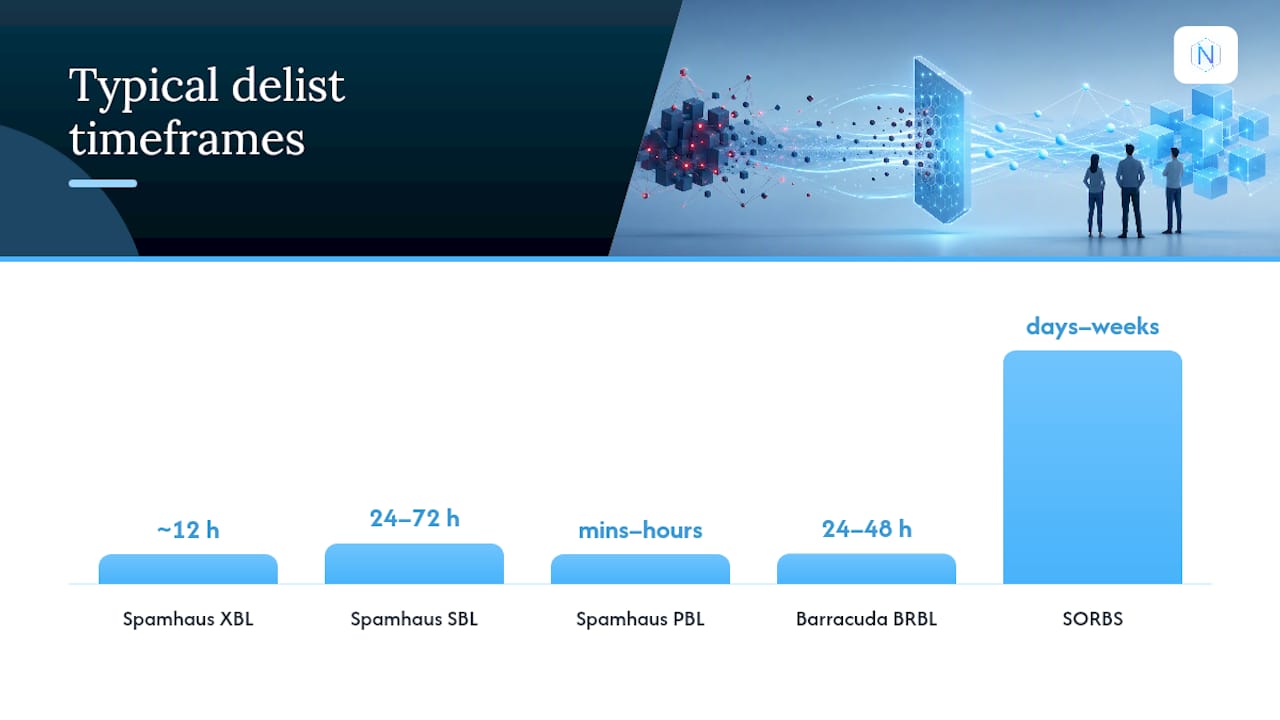
Timelines vary sharply by list, and knowing which lists auto-delist versus which require manual review changes how you plan your week:
| Blocklist | Review type | Typical timeframe |
|---|---|---|
| Spamhaus XBL | Automatic once traffic stops | Hours to 24 hours |
| Spamhaus SBL | Manual review | 24 to 72 hours, sometimes longer |
| Spamhaus PBL | Self-service removal | Minutes to hours |
| Barracuda BRBL | Manual review | 24 to 48 hours |
| SpamCop | Automatic decay | Hours to a few days |
| SORBS | Manual, can escalate | Days to weeks on escalation tiers |
One wrinkle worth knowing: Spamhaus PBL isn't a spam-abuse list at all. It's a policy statement that a residential or dynamic IP range shouldn't be sending mail directly, and the fix there is routing through an ISP smarthost or third-party sender rather than filing a traditional appeal.
How Do You Confirm You're Actually Delisted?
Don't take a single clean lookup at face value. Re-run your multi-list check 24 to 72 hours after remediation and log the result as proof the listing cleared, since some caches take a day or two to fully propagate the update across every resolver.
Keep watching after that first check clears:
- Check daily for the first week after delisting, then weekly for the following 30 days.
- Enroll in complaint feedback loops and postmaster tools where the provider offers them, since these surface complaint spikes before they turn into a fresh listing.
- Set a hard threshold, such as a complaint rate under 0.1%, and wire an automated alert to anything that crosses it.
- Build a short quarantine step into your workflow so any IP showing anomalous behavior gets pulled from rotation before it triggers a repeat listing.
Proxy Pool Hygiene: When to Isolate, Rotate, or Retire an IP
A blacklisted address inside a shared proxy pool is a different animal than a single mail server getting flagged. The first move is isolation, not investigation. Pull the flagged IP out of active rotation immediately, then audit pool logs to trace which session, client, or script generated the traffic that triggered it.
Static ISP proxies tend to hold reputation better for high-trust tasks like account management or ad verification, precisely because the address doesn't churn and providers can build a consistent history against it. Rotating residential pools used for scraping need a different discipline: stagger warmup periods for new IPs, avoid slamming a fresh address with high-volume requests on day one, and rotate on a schedule instead of reactively.
Behavior matters as much as the IP itself. Realistic browsing patterns, sensible rate limiting, proper CAPTCHA handling, and correctly formed request headers cut down on behavior-based flags that have nothing to do with your IP's history and everything to do with how a script is hitting a target site. Dedicated static ISP proxies and rotating residential proxies with country, state, and city targeting and unlimited bandwidth on the ISP side give operators room to separate high-trust traffic from higher-volume scraping work instead of running both through the same exposed pool.

Pro Tip: Keep a rolling log of which client or campaign used which IP and when. When a listing hits, that log turns a multi-hour investigation into a five-minute lookup.
Should You Remediate or Migrate to a New IP?
Remediation comes first, always. Migrating to a fresh IP without fixing whatever caused the listing just moves the same problem to a new address, and reputation systems catch on to that pattern fast. Save migration for genuinely stubborn cases, particularly escalation-tier listings on lists like SORBS that can drag on for weeks even after cleanup.
A managed proxy provider reduces how often you deal with this in the first place, mainly by keeping high-trust and high-volume traffic on separate infrastructure. That's an operational advantage, not a substitute for hygiene. Skip the pre-send verification, ignore your logs, or run scripts with no rate limiting, and you'll land back on a blocklist no matter whose IP you're using.
— proxy
A Practical Next Step: Reducing Repeat Listings With NatProxies
Clean remediation gets you off a blacklist. Keeping you off one long-term is a different problem, and it usually comes down to IP quality and separation. NatProxies is built around that separation: dedicated static ISP proxies for account management and ad verification where a consistent, trusted address matters, and rotating residential proxies with country, state, and city targeting for scraping and automation work that needs volume and geographic spread.

Static ISP addresses hold reputation over time because they aren't shared across unrelated campaigns the way a lot of budget proxy pools operate. Combine that with the sending and browsing hygiene covered above, and you cut down the odds of landing back on Spamhaus or Barracuda's radar in the first place. None of this replaces remediation. If your traffic pattern is the problem, a better IP just delays the next listing.
Check the ISP proxy plans or browse pricing to see which setup fits your volume, and review the acceptable use guidelines before migrating traffic over so your new IPs stay clean from day one.
Sources
- How to Remove Your IP from a Blacklist: 2026 Delisting Guide
- Fix a Blacklisted IP Address - Step-by-Step Delisting Guide
- Email Blacklist Removal in 2026: How to Delist From Spamhaus, Barracuda, and SORBS the Right Way | EmailVerifierAPI Blog
- Senderreputation
FAQ
How Long Does Proxy Blacklist Removal Usually Take?
Automatic lists like Spamhaus XBL and SpamCop can clear within hours once offending traffic stops, while manually reviewed lists like Spamhaus SBL often take 24 to 72 hours or longer.
Should I Change My IP Instead of Requesting Delisting?
Fix the root cause and request delisting first; migrate to a new IP only for stubborn or escalation-tier listings, such as SORBS ESCALATIONS, that resist standard removal.
What Does a Spamhaus PBL Listing Mean?
A PBL listing means the IP range is marked for residential or dynamic use and shouldn't send mail directly. The fix is routing outbound mail through an ISP smarthost or third-party sender rather than filing a traditional removal request.
Can a Blocklist Operator Refuse My Delisting Request?
Yes. Manually reviewed lists reject requests when they detect ongoing abuse, missing SPF, DKIM, or DMARC records, or vague evidence, so fix the underlying issue and document your remediation before resubmitting.
Do Managed Proxy Providers Prevent Blacklisting?
Some managed proxy providers reduce recurrence risk through IP separation and static ISP addresses, but they don't replace sending hygiene, rate limiting, or proper authentication records on your end.